Adding a New Locale
A Reepolee project ships with whatever locales you need - there's no "framework default" beyond the locales you declare. Adding one means registering the BCP 47 locale code, seeding its translations, and optionally localising URLs; the system picks it up automatically. Translations cascade across locales so a partial translation is never broken; missing keys fall back to a locale that has them.
Translations are file-first. The co-located
{locale}.jsonfiles are the source of truth. The Add locale tool copies the default-locale JSON files for the new locale and can AI-translate them in place. See Translations for the full model.
This recipe walks through adding French to a project that already has English and Slovenian. The same steps work for any BCP 47 locale code your project needs - fr-fr, de-at, es-es, and so on.
The Fast Path - bun reeman
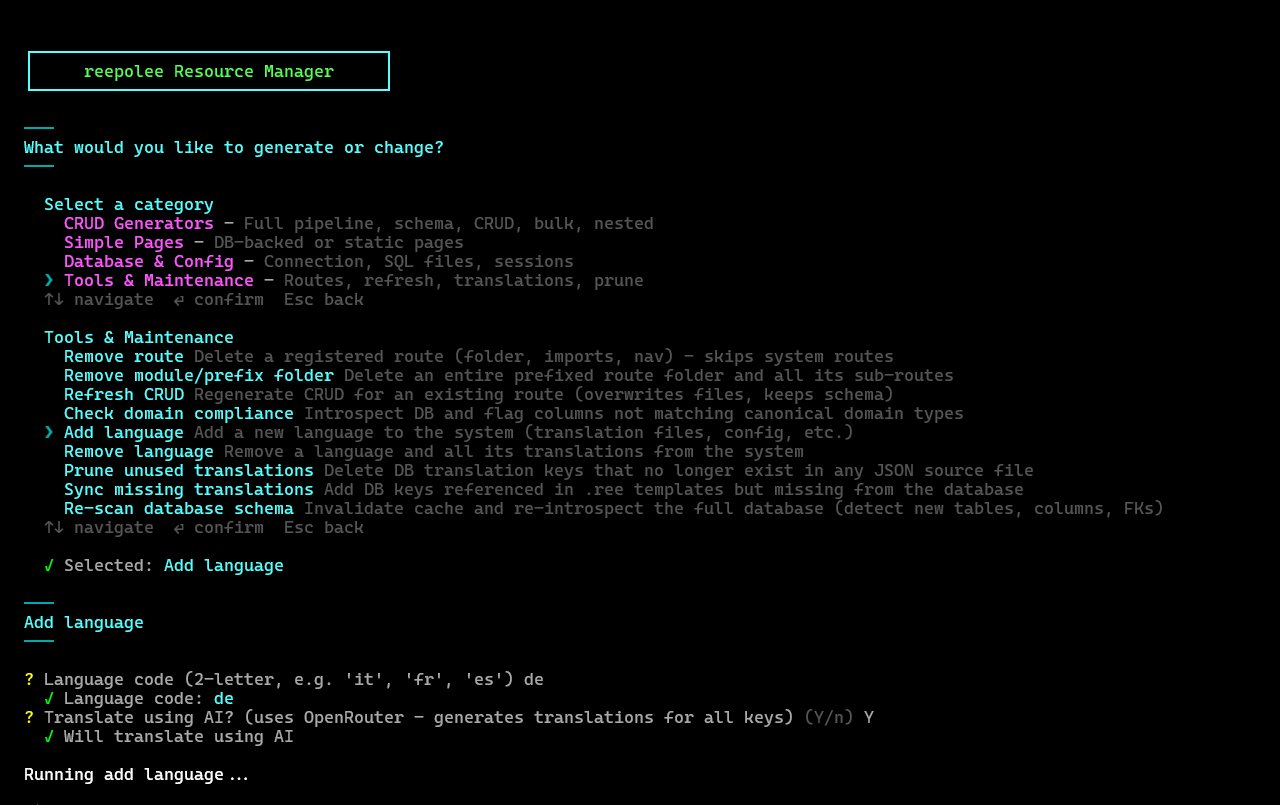
The interactive setup tool wraps the whole add-a-locale workflow:
bun reeman
# pick "Add locale" → enter "fr-fr" → answer "y" to AI-translate
What it does in one shot:
- adds the code to
locales,active_locales, andlocale_namesinconfig/supported_locales.ts - reads every default-locale JSON file and writes a copy for the new locale across all namespaces, so the new locale starts fully populated (with default-locale values as placeholders)
- updates the
ui.locale_names/ui.language_names_toentries for every existing locale so the new locale shows up in their pickers - when you opt in to AI translation, runs the one configured AI provider and translates the new values in the JSON files. Configure exactly one of Ollama, Gemini, OpenAI, Claude, xAI Grok, Hugging Face, or OpenRouter - see Dynamic Translations → Choosing a Provider
The rest of this page walks through the underlying pieces, plus the URL-localisation and locale-mismatch dialog details. With the reeman fast path you can skip straight to Step 4: Localise URLs.
If you already have a curated translation bundle for the locale (an externally-translated file, or a framework-shipped archived locale), skip the AI pass and use the archive workflow in Locale Archives & Bundles instead:
import-translation-bundle … --install --activateorinstall-locale <code> --activate.
Step 1: Register the Locale
Open config/supported_locales.ts and add "fr-fr" to both locales and active_locales:
export const locales = ["en-us", "sl-si", "fr-fr"] as const;
export const active_locales = ["sl-si", "en-us", "fr-fr"] as const;
export const default_locale = "en-us";

export const locale_names: Record<string, string> = {
    "en-us": "EN",
    "sl-si": "SL",
    "fr-fr": "FR",
};

export const locale_aliases: Record<string, string> = {};
The two arrays serve different purposes:
locales- every locale whose{locale}.jsonfiles are loaded.active_locales- the locales the picker shows users. Usually equal tolocales, but you can keep a locale out of the picker while you're translating it (setactive_localesto["sl-si", "en-us"]andlocalesto["sl-si", "en-us", "fr-fr"]; French strings load but no UI offers French to users).
locale_names is what the picker displays. locale_aliases points one locale at another's UI strings when you want to serve the same strings to several regions (e.g. "de-at": "de-de") - see Locales.
After this change, add the French JSON files. The reeman flow does this automatically; if you edit the config manually, run the add-locale generator next.
Step 2: Create Root Translations
The add-locale generator copies the default-locale translation files for French. If you registered the locale by editing the config, run it explicitly:
bun reeman add-locale fr-fr
Edit the copied files in the /translations admin UI, or edit the JSON directly. For example, root values use the root namespace (the {locale}.json at the repository root):
// fr-fr.json (repository root)
{
    "labels": {
        "save": "Enregistrer"
    }
}
Keep the same key paths as the default locale. The route_name key is reserved for URL segment localisation and belongs in the relevant route namespace (see Step 4 below).
Restart the dev server. Visit /?locale=fr-fr and the labels appear in French - the locale switcher in the layout now offers French alongside Slovenian and English.
Step 3: Translate Route-Specific Strings
Every namespace that has default-locale and Slovenian files needs French files for full coverage. The Add locale reeman does this for you when you add the code (above): it copies every default-locale JSON file to the new locale so French starts fully populated with default-locale values as placeholders. If you registered the locale by editing the config by hand, run the same step explicitly:
bun reeman add-locale fr-fr            # copy en-us.json → fr-fr.json
bun reeman add-locale fr-fr --translate # …and AI-translate them in place
At this point French exists for every key, but the values are still English. Fill them in by editing through the /translations admin UI, or let the AI pass do the first draft (next).
Restart the server, visit /login?locale=fr-fr, confirm the strings render - they'll read in English until translated, never as blanks or braced key paths.
Auto-Translating Missing Keys
For the first pass on many strings, let an LLM fill in the gaps. sync-translations scans the JSON files for keys present in one locale but missing (or still untranslated) in another, translates them, and writes the results back to the files:
bun reeman sync-translations --translate
This uses whichever AI provider your environment selects - Ollama, Gemini, OpenAI, Claude, xAI Grok, Hugging Face, or OpenRouter (Choosing a Provider). The run sends each key with the source locale value as context to the model and writes the translation to the JSON files. Output cost is cheap - translating an entire mid-sized application's strings runs to a few cents.
Always review LLM-translated strings before shipping (the /translations admin UI is the place to do it). The model gets nuance right most of the time but occasionally produces overly literal phrasing or mistranslates UI conventions ("Submit" as a verb vs as a button label, for example).
Step 4: Localise URLs
Reepolee translates URL segments through the route_name key in the locale files. The canonical /login URL becomes /connexion in French if you add:
// platform/auth/login/fr-fr.json
{
    "route_name": "connexion"
}
Now /login is also reachable as /connexion in French. The handler is the same; the URL is an alias. For URLs mounted under a prefix (e.g. /admin/users), translate each segment via its own route_name so the full path localises (/admin/uporabniki).
The route map is built at startup, so restart the server to pick up new route_name translations. Confirm by:
- Visiting
/connexiondirectly - the login form renders in French (because the URL implies French). - Switching to French via
?locale=fr-frfrom any page - the browser redirects to the French version of the canonical URL, including the localised path.
route_name is the only translation key that doesn't fall back across locales. If you don't translate the URL for a specific feature, the canonical segment is used. That's intentional - it lets you ship a fully-translated UI before translating any URLs and have everything work.
Step 5: The Locale-Mismatch Dialog
A French-speaking user (cookie says locale=fr-fr) might land on /login (the English URL) by clicking a link in an email or sharing. To avoid silently switching locales, the layout includes a dialog that detects the mismatch and offers to switch.
The dialog uses the user's preferred locale (French in this case) for its own text - so the offer is comprehensible. Add its keys in the root namespace through the /translations admin UI or by editing the JSON:
// fr-fr.json (repository root)
{
    "ui": {
        "lang_mismatch_title": "Langue différente",
        "lang_mismatch_body": "Cette page est en",
        "locale_names": {
            "en-us": "anglais",
            "sl-si": "slovène",
            "fr-fr": "français"
        }
    },
    "actions": {
        "lang_mismatch_switch": "Garder ma langue",
        "lang_mismatch_dismiss": "Rester ici"
    }
}
locale_names is for nominative use ("English"); language_names_to is for the "Switch to X" prepositional context where French (and many other languages) inflects the noun differently. For English both forms happen to be the same, but for other languages they diverge.
The ui.language_names_to entries (like ui.language_name* / ui.language_names*) are exempt from sync-translations' identical-to-English check - see Excluded Translations. The exclusion lives in config/excluded_translations.ts, so a language's native name ("English" in every locale) isn't re-sent to the AI on every sync run. The ui.locale_names.* picker labels above are not exempt - if you seed them with the same value in every locale, sync-translations will flag them as untranslated until you translate them.
To test: visit any page with ?locale=fr-fr, then change the URL to a Slovenian-only path (/o-nas if your project has it). The dialog should appear, in French, asking whether to stay or switch.
Step 6: Locale-Aware Formatting
Date and currency helpers automatically use the active locale via props.locale:
<p>{= js_date_to_locale_string(record.created_at) }</p>
<!-- en-us: "1/15/2026"  sl-si: "15. 1. 2026"  fr-fr: "15/01/2026" -->

<p>{~ display_currency(record.price) }</p>
<!-- en-us: "€1,234.56"  sl-si: "1.234,56 €"  fr-fr: "1 234,56 €" -->
Because we registered fr-fr as a full BCP 47 locale in Step 1, every helper that takes an optional locale uses French formatting on French pages without per-call configuration.
For locale-specific currency - euro for European locales, dollar for US English, yen for Japanese - pass the symbol explicitly when it varies per locale:
{~ display_currency(record.price, props.locale, false, props.locale === 'fr-fr' ? '€' : '$') }
A cleaner pattern is a helper map per locale, or a translation key that holds the symbol:
// root en-us.json: "currency_symbol": "€"
{~ display_currency(record.price, props.locale, false, props.currency_symbol) }
Step 7: The html lang Attribute
The <html lang="..."> attribute should reflect the current page's locale for screen readers and search engines. The shipped layout already does this:
<html lang="{= props.locale }"></html>
props.locale is auto-injected by render() based on the resolution chain (see Locales). After Step 1, French pages get <html lang="fr-fr"> automatically - no further changes needed.
For stricter SEO - separate URLs per locale, sitemap entries per locale, hreflang annotations - generate them from the route map:
<!-- in <head> -->
{#each props.active_locales as code }
    {{ const localized = localized_path_for(props.request_url, code) }}
    {#if localized && code !== props.locale }
        <link rel="alternate" hreflang="{= code }" href="{= localized }" />
    {/if}
{/each}
hreflang tags tell search engines which URL serves each locale version. Combined with localised URLs, this gives search engines the full picture of a multilingual site.
Step 8: Finding Untranslated Strings
Because add-locale seeds the new locale with default-locale values, an untranslated key shows up as a French value that still equals the source value. Compare the French {locale}.json files against the English ones to list them - the /translations admin UI is the convenient place to work through them; bun reeman sync-translations --translate will AI-fill the same gaps in one pass.
Keys under the excluded prefixes in config/excluded_translations.ts (notably ui.language_name* and ui.language_names_to) are intentionally identical across locales, so sync-translations skips the identical-value check for them - see Excluded Translations.
Browse the site in the new locale with the dev server's props.toJSON debug. In dev mode, every render injects props.toJSON (the full data payload as JSON). Append a <pre>{~ props.toPrettyJSON }</pre> to a development-only debug route, navigate the site in French, and any value that's still in English shows up in the JSON dump.
Removing a Locale
Removing a locale is a single reeman action - the reverse of adding one:
bun reeman
# pick "Remove locale" → choose the code → confirm
It strips the code from config/supported_locales.ts, deletes every {locale}.json file for that locale, and cleans up cross-locale references (the ui.locale_names / ui.language_names_to entries other locales held for it). If you remove the current default_locale, it picks the first remaining locale as the new default. The CLI form is bun reeman remove-locale <locale_code> [--force] [--new-default <locale_code>] (--force skips the confirmation prompt for scripted use; --new-default picks the fallback default locale instead of the first one remaining).
What's Next
You have a third locale wired in end-to-end - strings, URLs, the mismatch dialog, locale-aware formatting. Adding a fourth (or removing one) is exactly the same flow.
To go deeper:
- Translations - the namespace model and missing-key behaviour.
- Localized Routes - the route-map machinery that powers URL aliasing.
- Locales - locale resolution, the X-Locale header, building a custom locale picker.