Schema & Initialization
Reepolee reads its database schema from per-dialect SQL files under sql/sqlite/ (SQLite) or sql/mysql/ (MySQL). Each folder holds a numbered, ordered set - the base schema (01-init-sqlite.sql / 01-init-mysql.sql) followed by optional seed data. These files are the source of truth for the shape of the database. There is no migration runner, no schema versioning, and no separate "create" vs "alter" commands. (UI translations are not part of the schema - they live in co-located {locale}.json files, see Translations.)
The file uses DROP TABLE IF EXISTS followed by CREATE TABLE for each table, so running it gives you a clean schema and seed data every time. You run it yourself - the driver does not apply it automatically on startup. That keeps real user data safe across restarts. Running the file is a one-time step on a fresh database; subsequent schema edits are your responsibility.
The init File Format
A typical table definition from the shipped demo files (sql/sqlite/demos/05-frameworks.sql):
DROP TABLE IF EXISTS developers;

CREATE TABLE developers (
    id         INTEGER   PRIMARY KEY,
    name       TEXT      DEFAULT '',
    display    TEXT      GENERATED ALWAYS AS(name) VIRTUAL,
    created_at TIMESTAMP NOT NULL DEFAULT CURRENT_TIMESTAMP,
    updated_at TIMESTAMP DEFAULT CURRENT_TIMESTAMP
);

CREATE INDEX developers_name ON developers(name);

CREATE TRIGGER developers_updated_at_trigger AFTER UPDATE ON developers FOR EACH ROW WHEN NEW.updated_at IS OLD.updated_at BEGIN
    UPDATE developers
    SET
        updated_at = CURRENT_TIMESTAMP
    WHERE id = NEW.id;
END;
The updated_at trigger is the convention Reepolee's generators expect - generated sql.ts queries don't set updated_at manually because the trigger handles it. If you write tables by hand, include the trigger so generated code (and hand-written code) behaves consistently across tables.
Row Display Contract
Every application table must expose a string display column, normally as a generated column. It is the canonical row representation used by generated searches, ordering, foreign-key controls, and autocomplete. Because it is generated, Reepolee keeps it readable but never sends it in a generated create or update payload.
An optional string option_display column can provide a richer selector label. When present, generated <select> and <auto-complete> controls use it instead of display. For example, an organisation can retain its name as the canonical display and include its VAT ID in a selector:
CREATE TABLE organisations (
    id INTEGER NOT NULL PRIMARY KEY AUTOINCREMENT,
    name TEXT NOT NULL,
    vat_id TEXT NOT NULL,
    display TEXT GENERATED ALWAYS AS (name) VIRTUAL,
    option_display TEXT GENERATED ALWAYS AS (name || ' - ' || vat_id) VIRTUAL
);
The generator validates this contract while loading schema metadata. Add display to every table before generating or refreshing CRUD.
For MySQL, the trigger syntax differs slightly:
DELIMITER $$

CREATE TRIGGER developers_updated_at_trigger
BEFORE UPDATE ON developers
FOR EACH ROW
BEGIN
    SET NEW.updated_at = CURRENT_TIMESTAMP;
END$$

DELIMITER ;
The MySQL driver script handles the trigger as a single statement automatically.
Domain Types
Reepolee defines a canonical vocabulary of column types — domain types —
that every new table and column should draw from. Rather than each table
inventing its own width for a name or its own precision for money, you pick
the domain type that matches the column's meaning and get a consistent SQL
type. They're defined as typed constants in config/domain_types/mysql.ts
and config/domain_types/sqlite.ts.
The 40+ types cover primary keys, names, text, monetary values, temporal
columns, durations, booleans, contact fields, codes, addresses,
security/system fields, and media paths. A few diverge per dialect — notably
pk_id, uuid_v7, boolean, date, json_data, and currency_code.
Column names drive type matching: a column called first_name picks up the
first_name domain type automatically. Suffix and prefix conventions
(_at → timestamp, _on → date, is_ → boolean, _image → image path)
tie back to config/db_structure.ts,
so the generator produces the right form control for each column without manual tagging.
See the Domain Types Reference for the complete table with MySQL and SQLite SQL for every type.
To audit an existing schema against this taxonomy, run the Check domain
compliance tool from reeman (bun reeman → Tools & Maintenance), which
reports columns whose types deviate from the canonical domain types so you
can plan migrations.
Applying the Schema
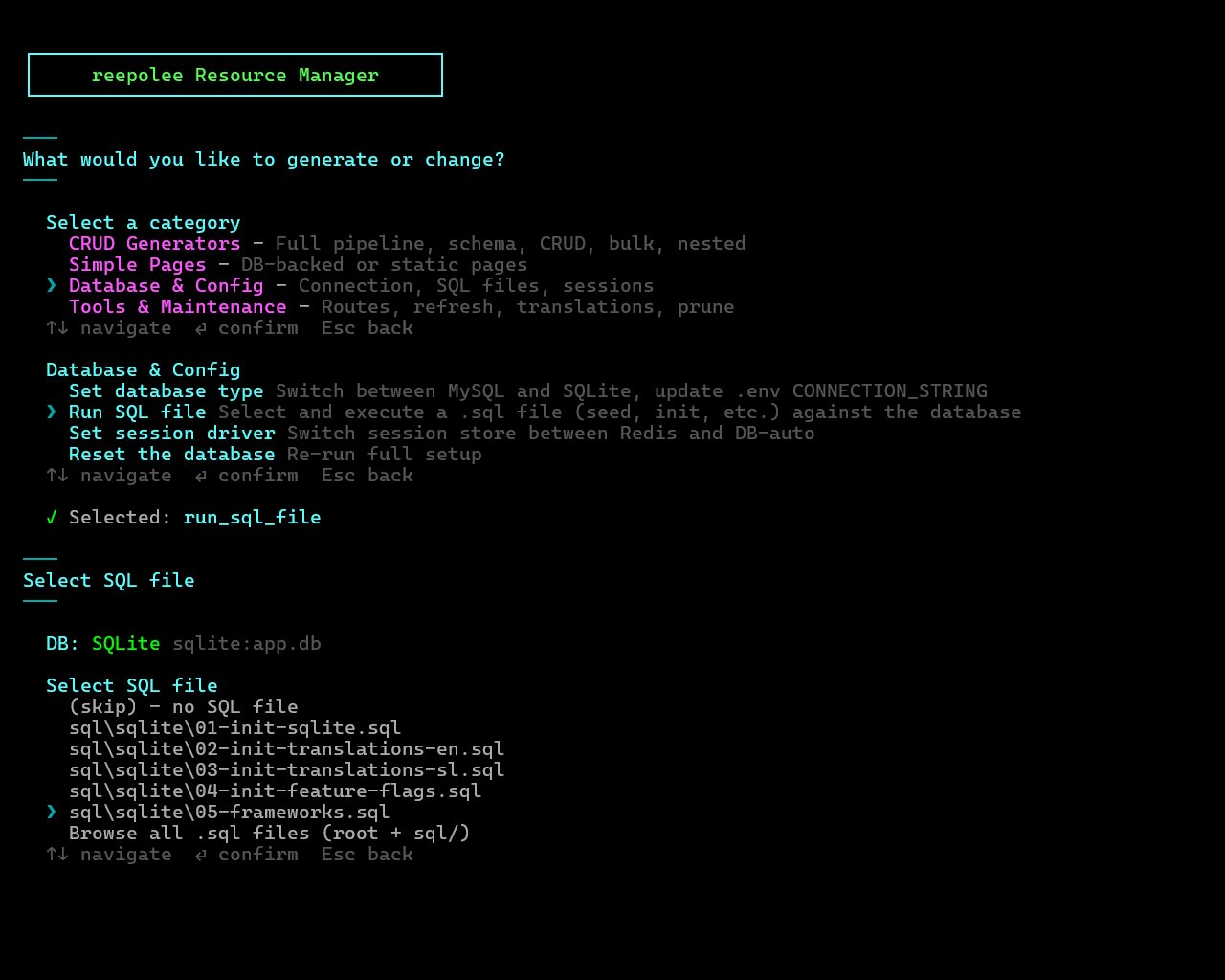
The easiest path is reeman:
bun reeman
# pick "Run SQL file" → choose 01-init-sqlite.sql / 01-init-mysql.sql
The reeman detects your database type from DEV_CONNECTION_STRING and lists the .sql files in the matching sql/<type>/ folder first (with a "Browse all" option for the project root and sql/), asks for confirmation, then connects via DEV_CONNECTION_STRING and runs each statement, reporting per-statement success or failure. For MySQL it wraps the run in SET FOREIGN_KEY_CHECKS = 0/1 so DROP order doesn't matter. The "Run SQL file" option also lives inside the Quick Start flow that runs on a brand-new project. Run the numbered files in order - schema first, then the seed files.
If you'd rather drive the database CLIs directly, the init files are plain SQL - run them with whatever you have at hand.
SQLite. Run the file against the database file referenced in DEV_CONNECTION_STRING (sqlite:app.db → app.db):
sqlite3 app.db < sql/sqlite/01-init-sqlite.sql
The file's DROP TABLE IF EXISTS statements clear anything that was there, and the CREATE TABLE / INSERT statements rebuild the schema and seed data. SQLite creates the database file on first connect, so you don't have to do anything else first.
MySQL. Wrap the run so foreign-key order doesn't bite you:
mysql -u login -p reepolee_dev < sql/mysql/01-init-mysql.sql
If your seed file references tables in an order MySQL doesn't like, prepend SET FOREIGN_KEY_CHECKS = 0; to the file and SET FOREIGN_KEY_CHECKS = 1; to the end (the shipped 01-init-mysql.sql already does this).
You only run this once on a fresh database. After that, the schema lives in the database itself and the application reads it on startup. Apply schema changes with hand-written ALTER TABLE statements (or by editing the init file and re-running it on a fresh database - see Production Considerations).
Indexes
Add indexes after the CREATE TABLE for any column you'll search or sort by:
CREATE INDEX developers_name ON developers(name);
CREATE UNIQUE INDEX frameworks_name_unique ON frameworks(name);
The generator looks for unique indexes when producing validation - a column with a unique index gets a "duplicate value" error message keyed off the constraint name automatically.
For composite indexes (multi-column), list the columns in the order you'll filter:
CREATE INDEX orders_user_status ON orders(user_id, status);
This index speeds up WHERE user_id = ? AND status = ? and WHERE user_id = ? (the leading column), but not WHERE status = ? alone.
Foreign Keys
Foreign keys are written inline with the CREATE TABLE:
CREATE TABLE frameworks (
    id              INTEGER   PRIMARY KEY,
    name            TEXT      NOT NULL,
    tagline         TEXT      DEFAULT '',
    developer_id    INTEGER   NOT NULL REFERENCES developers(id) ON UPDATE CASCADE,
    reviewer_id     INTEGER   NOT NULL REFERENCES developers(id) ON UPDATE CASCADE,
    language_id     INTEGER   NOT NULL REFERENCES languages(id) ON UPDATE CASCADE,
    first_commit_on DATE      NOT NULL,
    is_javascript   INTEGER   NOT NULL,
    display         TEXT      GENERATED ALWAYS AS(name) VIRTUAL,
    created_at      TIMESTAMP NOT NULL DEFAULT CURRENT_TIMESTAMP,
    updated_at      TIMESTAMP DEFAULT CURRENT_TIMESTAMP
);

CREATE INDEX frameworks_developer_id ON frameworks(developer_id);
CREATE INDEX frameworks_reviewer_id ON frameworks(reviewer_id);
CREATE INDEX frameworks_language_id ON frameworks(language_id);
Indexes on foreign-key columns aren't free - add them explicitly so joins and lookups stay fast.
The CRUD generator detects foreign keys in two ways: explicit FOREIGN KEY constraints (the cleanest approach) or a column name ending in _id. Either way, the generated form renders the foreign-key field as a <select> populated from the related table's display or, when available, option_display. See Generators.
Views
For pre-joined data - list views that need column data from related tables - define a SQL view next to the underlying tables:
DROP VIEW IF EXISTS v_frameworks;

CREATE VIEW v_frameworks AS
SELECT
    f.id,
    CAST(f.name AS TEXT) AS display,
    f.name,
    f.tagline,
    f.first_commit_on,
    f.is_javascript,
    f.developer_id,
    f.language_id,
    f.reviewer_id,
    d.display       AS developer_display,
    l.display       AS language_display,
    a2.display      AS reviewer_display
FROM frameworks f
    LEFT JOIN developers d
        ON d.id = f.developer_id
    LEFT JOIN developers a2
        ON a2.id = f.reviewer_id
    LEFT JOIN languages l
        ON l.id = f.language_id;
The convention v_<table> names views after the table they augment. A view must include its own string display column (it can reuse the table's), and each joined foreign key must be named <relationship>_display, such as developer_display for developer_id. Generated grids use that label in place of the raw FK ID. Generated list templates can read from the view by overriding select_table in the route's table.ts. See Database for how table.ts ties into list rendering.
Seed Data
INSERT statements live in the same init file, so they ship as seed data alongside the schema. Hard-code primary keys when you want them to stay stable across re-runs:
INSERT INTO main.developers (id, name) VALUES
(1,'Aleš'),
(2,'Vishal'),
(3,'Evan'),
(4,'Jordan'),
(5,'Rich');
For larger seed sets, a separate numbered file kept alongside the schema in sql/sqlite/ (e.g. 03-seed-users.sql) keeps the schema file readable. Import it the same way as the init file and run it after initialization - the numeric prefix keeps the run order obvious.
Re-running the Init File
In development, re-running the init file is a fast way to reset the database - drop everything, recreate, get fresh seed data. The driver doesn't auto-run it, so wiping your data is always a deliberate command, not a side effect of restarting the server.
# SQLite - nuke and pave
rm -f app.db && sqlite3 app.db < sql/sqlite/01-init-sqlite.sql
For tables you want to preserve across re-runs (typically users in any production-ish environment), comment out the matching DROP TABLE IF EXISTS line and switch the create to CREATE TABLE IF NOT EXISTS. Once that table exists in the live database, the file becomes a no-op for it on re-run while the rest still drops and recreates:
-- DROP TABLE IF EXISTS users;

CREATE TABLE IF NOT EXISTS users (
    ...
);
New columns on a preserved table still need an explicit ALTER TABLE - there's no automatic migration.
Production Considerations
When the application is past the "iterate on schema freely" phase and starts holding real data:
- Stop re-running the full init file in production. Treat each
DROP TABLEas a destructive command, not a routine reset. - Track schema changes in version-controlled SQL files (e.g.,
migrations/001_add_users_email_index.sql). Apply them manually on each deploy until you decide a migration runner is worth the dependency. - Back up before every schema change. SQLite is a single file -
cp app.db app.db.backupis enough. MySQL hasmysqldumpfor the same purpose. - Test schema changes against a copy of production data, not just an empty schema. Index changes especially can take much longer on a large table than they appear in development.
If you eventually outgrow the manual approach, dropping in a small migration runner (or a tool like Liquibase or Atlas) is the next step. Reepolee doesn't ship one because most projects don't need one for a long time, but the path from "manual SQL files" to "real migrations" is a short one when you're ready.