Validation
Reepolee uses Zod for validation. The library is vendored at vendor/zod.min.js, so it is part of your codebase. Each generated route folder has one schema in validation_server.ts. It validates submitted form values and supplies translated errors to the live validation endpoint.
The same schema runs in two places: on the server when the form is submitted, and on a JSON validate endpoint that FormController calls on every blur. The server check is the source of truth; the live check exists for UX.
The Generated Schema
The generated Books resource uses this schema:
export const schema = z.object({
    id: z.coerce.number().optional(),
    title: z.string().min(1, "title_required"),
    author: z.nullable(z.string().optional()),
    isbn: z.nullable(z.string().optional()),
    published_on: z.nullable(z_date_optional),
    is_in_stock: z.nullable(z.coerce.number().min(0, "is_in_stock_required").optional()),
});
There is no generated index_schema or form_schema. Database rows keep the types returned by Bun's SQL driver. Templates format values for HTML controls explicitly. For example, the Books form uses js_date_to_iso_string(record.published_on) for its date input.
Running Validation
validation_server.ts exports two convenience wrappers around validate_schema():
export const validate = (data, messages) => validate_schema(schema, data, undefined, messages);

export const validate_touched = (data, touched, messages) => validate_schema(schema, data, touched, messages);
Both return a tuple [errors, valid_data]. If validation passes, errors is {} and valid_data is the parsed input. If it fails, errors is keyed by field name and valid_data is null:
import { validate } from "./validation_server";

const [errors, valid_data] = validate(data, ctx.translations.errors);

if (Object.keys(errors).length > 0) {
    return render("users/form", {
        data: { record: data, errors },
        ctx,
    });
}

await create_record(valid_data);
return Response.redirect("/users", 303);
The second argument - ctx.translations.errors - is the translation map for the active locale. validate_schema() looks up each Zod error message string (the translation key) in that object and replaces it with the human-readable text. The key "email_required" becomes the active locale's errors.email_required value from the locale JSON files.
Use valid_data (the parsed, type-coerced object) - not the raw data you started with - when you hand the input on to the database or other services. valid_data has numbers coerced from strings, dates decoded into Date, optional empty strings normalised to null, and any field that isn't in the schema dropped. The shipped auth handlers (login, register, password, profile) all read _valid_data.email, _valid_data.password, etc. on the success path for that reason.
Partial Validation
validate_touched only reports errors for the fields listed in the touched array. This is what the live validation endpoint uses - when a user has just tabbed off the email field, you only want to surface the email error, not flag every other empty required field:
export async function post_books_validate(req: BunRequest): Promise<Response> {
    const ctx = await create_ctx(req, import.meta.dir);
    const body = await req.json();
    const touched: string[] = body.touched || [];
    const [errors] = validate_touched(body, touched, ctx.translations.errors);

    return Response.json({ success: Object.keys(errors).length === 0, errors }, { status: 200 });
}
The response shape - { success: boolean, errors: Record<string, string> } - is what FormController expects. The same endpoint serves the live per-field validation and the all-fields validation that runs on submit.
Client-Side: FormController
FormController is a small vanilla JS class in static/form-controller.js that wires up live validation without any framework. Point it at the form element and its validate endpoint:
<script src="/form-controller.js" defer></script>
<script>
    document.addEventListener("DOMContentLoaded", () => {
        new FormController({
            form: "#entry-form",
            validate_url: "/user/books/validate",
        });
    });
</script>
From that point on, FormController does three things:
- Tracks input values - it caches the form's initial values and listens to
inputevents on every named input, textarea, and select. - Validates on blur - when the user tabs off a field (
focusout), it posts the current values plus atouched: [field_name]array tovalidate_urland writes the response'serrors[field_name]into the<validation-error>element with iderror-{field_name}. - Validates on submit - when the form is submitted, it
preventDefaults, posts all fields tovalidate_url, and only allows the native form submission to fire if the server returnssuccess: true. If there are errors, they're rendered inline and the POST to the server never happens.
The validation-error Element
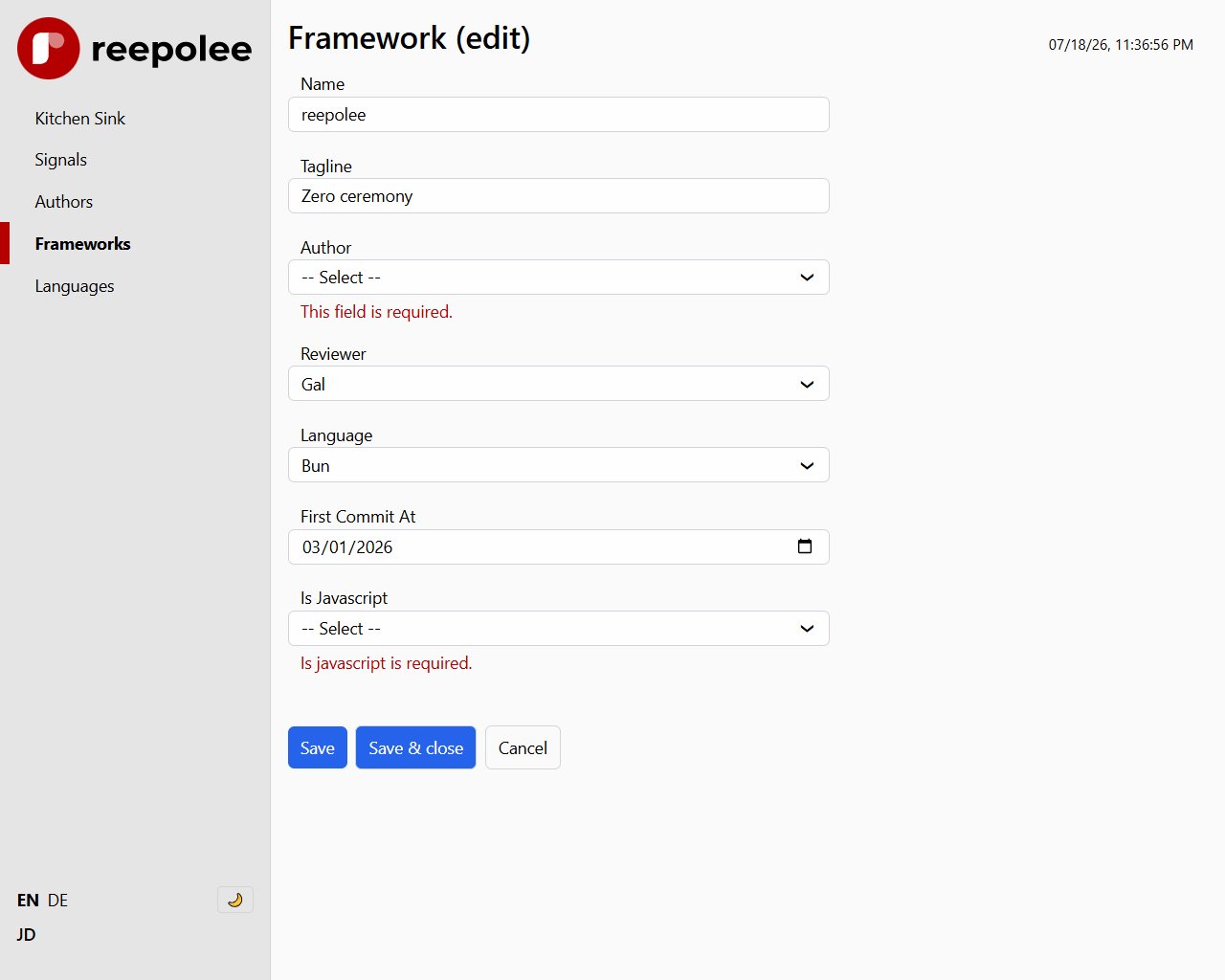
Validation errors render inside a <validation-error> custom element. The element is a thin shadow-DOM wrapper that displays its slotted content and re-renders when the content changes:
<input type="text" id="title" name="title" value="{= record.title }" />
<validation-error id="error-title"></validation-error>
Two things happen here:
- On a failed form POST, the server renders the form with its validation errors.
- On live validation,
FormControllerfinds#error-titleand replaces its content with the returned error string.
The element renders nothing when its content is empty, so an unused <validation-error> is invisible.
The convention id="error-{field_name}" is what makes the wiring automatic - there is no registration step beyond matching the id. All of the shipped input components follow this convention.
Error Messages and Translations
Validation error messages live in the locale JSON files under the errors key path:
// apps/main/user/books/en-us.json
{
    "errors": {
        "title_required": "Title is required",
        "is_in_stock_required": "Select whether this book is in stock"
    }
}
Your Zod schema references these keys as the message string:
title: z.string().min(1, "title_required"),
At validation time, validate_schema() swaps each key for the translated string. Add a key to the JSON file and reference it in the schema. The full localisation story is in Translations.
Dates and Form Values
The generated schema validates the strings posted by HTML date controls with helpers from $lib/validation_helpers:
| Helper | Use case |
|---|---|
z_date_required | Required date input |
z_date_optional | Optional date input |
z_datetime_required | Required datetime-local input |
z_datetime_optional | Optional datetime-local input |
import { z_date_optional } from "$lib/validation_helpers";

export const schema = z.object({
    published_on: z.nullable(z_date_optional),
});
Formatting an existing database value for an input is a template concern. The generated Books form uses js_date_to_iso_string() to produce YYYY-MM-DD.
The generated date.ree field renders the masked <date-input> custom element (see Input Components) rather than a plain <input type="date">. It reads its validation messages from the translations spread as attributes - errors.date_required, errors.invalid_date, errors.date_min, and errors.date_max - all seeded in the root namespace (the seed also ships errors.date_not_future for your own future-date rules). The z_date_* codecs above are still the server-side source of truth; the component just surfaces the same class of errors live in the field.
Custom Rules
The schemas the generator produces cover the common cases. Project-specific rules - "country code must be one of SI, DE, HR", "release date must be in the future", "this user can't be assigned to this team" - go in your route handler after the standard validation runs:
const [errors, valid_data] = validate(data, ctx.translations.errors);

if (valid_data && !["SI", "DE", "HR"].includes(valid_data.country_code)) {
    errors.country_code = ctx.translations.errors.country_invalid;
}

if (Object.keys(errors).length > 0) {
    return render("users/form", { data: { record: data, errors }, ctx });
}
You can also add the check inside the Zod schema with .refine() if it's purely shape-based, but for rules that depend on database lookups (uniqueness, foreign-key existence) the handler is the right place.