Routing
Reepolee routes are defined declaratively in apps/main/routes.ts using RouteDefinition objects. Each definition includes a URL pattern, a handler function, and optional metadata for navigation labels, module gating, and localisation. The route table is assembled by build_routes() and handed to Bun's built-in router at startup.
Any path that does not match a registered route falls through to the fetch function in apps/main/server.ts, which serves static files from static/ and renders the 404 page. Customising that fallback is covered in Error Handling.
Defining Routes
A route handler is a function that receives a BunRequest and returns a Response. Assign one directly to a path to handle GET requests:
// Minimal example. The real top-level route table uses the declarative
// `build_routes()` helper, which is covered further down on this page.
export const routes = {
    "/": home_page,
    "/about": about_page,
};
When a path needs to respond to multiple HTTP methods, use a method map instead:
export const routes = {
    "/users": {
        GET: get_users_index,
        POST: post_users_index,
    },
    "/users/new": get_users_new,
    "/users/validate": {
        POST: post_users_validate,
    },
};
Every handler follows the same shape:
export async function home_page(req: BunRequest): Promise<Response> {
    const ctx = await create_ctx(req, import.meta.dir);
    return render("home", { ctx });
}
URL Parameters
Use :param segments in the path to capture dynamic values. Bun makes them available on req.params:
"/users/:id/edit": {
    GET: get_users_edit,
    POST: post_users_edit,
},
export async function get_users_edit(req: BunRequest<"/users/:id/edit">): Promise<Response> {
    const ctx = await create_ctx(req, import.meta.dir);
    const id = req.params.id;
    const record = await get_record_by_id(id);
    return render("users/form", { data: { record }, ctx });
}
Reading query strings, form bodies, and JSON payloads is covered in Requests & Responses.
CRUD Modules
A CRUD module is just an exported object that holds several related routes together. You spread it into the main route table, which keeps routes.ts concise even as your application grows:
// apps/main/users/index.ts
export const users_crud = {
    "/users": {
        GET: get_users_index,
        POST: post_users_index,
    },
    "/users/new": get_users_new,
    "/users/validate": {
        POST: post_users_validate,
    },
    "/users/:id/edit": {
        GET: get_users_edit,
        POST: post_users_edit,
    },
};
// apps/main/routes.ts
import { users_crud } from "$main/users";
import { auth_crud } from "$platform/auth";

export const routes = {
    "/": home_page,
    ...users_crud,
    ...auth_crud,
};
The generator produces this structure automatically when you scaffold a new resource - see Generators.
Declarative Route Definitions
The top-level apps/main/routes.ts uses a small helper layer - build_routes() and build_nav_routes() from $lib/route_builder - that lets you describe each route as a RouteDefinition object instead of a bare key/value pair. The payoff is that menu entries, module-based access control, and mount_prefix wiring all come from the same array:
import { build_nav_routes, build_routes, type RouteDefinition } from "$lib/route_builder";
import { about_page } from "$main/examples/about";
import { open_free_map_page } from "$main/examples/open_free_map";
import { developers_crud } from "$main/developers";
import { home_page } from "$main/home";
import { auth_crud } from "$platform/auth";

const route_definitions: RouteDefinition[] = [
    { url: "/", handler: home_page },
    { url: "/examples/about", handler: about_page, nav_title_key: "about", module: "examples" },
    { url: "/examples/open_free_map", handler: open_free_map_page, nav_title_key: "open_free_map", module: "examples" },
    { url: "/developers", crud: developers_crud, nav_title_key: "developers" },
];

export const nav_routes = build_nav_routes(route_definitions);

export const routes = {
    ...build_routes(route_definitions),
    ...auth_crud,
};
Business-table CRUD, home, examples, and the shared auth_crud are the only things wired into the main app's apps/main/routes.ts. The system/admin pages (Users, Translations, Modules, Global Scopes, Files, Images, Queues, Software Update, ...) are served by a separate process (apps/reeman/server.ts, routes under apps/reeman/) at root URLs like /users - they never appear in the main app's route table. See Module System and Quick Start.
Each RouteDefinition chooses one of four shapes:
| Field | Used when |
|---|---|
handler | A single function answers GET for this URL |
methods | A { GET, POST, ... } map answers multiple methods |
resource | An imported route table (e.g. email_page) is spread in as-is |
crud | A generated CRUD module is mounted under a prefix derived from url and optionally guarded by module |
The extra fields drive everything else:
nav_title_key- the translation key for this route's navigation label.build_nav_routes()filters to entries with this key set, so the nav menu and the routes stay in sync from a single source.module- gates the route behindrequire_module_mw(module). Forcruddefs this is applied to every URL the CRUD table mounts; for nav entries it groups the link under that module in the menu. Available modules are loaded at startup from themodulestable - see Authorization.is_menu_entry- set tofalseto keepnav_title_keyfor translation lookup but suppress the nav entry.
apps/main/server.ts reads nav_routes into grouped menu sections - entries without a module come first, then grouped alphabetically by module - so adding { module: "admin", nav_title_key: "..." } to a route automatically slots it into the right group.
What's Next
Routes by themselves only resolve URLs to handlers. To wrap groups of routes with cross-cutting behaviour - logging, language detection, authentication - see Middleware. To mount an entire route table under a URL prefix (the way the admin section is built), see the prefixed routes section there.
Adding and Removing Routes via reeman
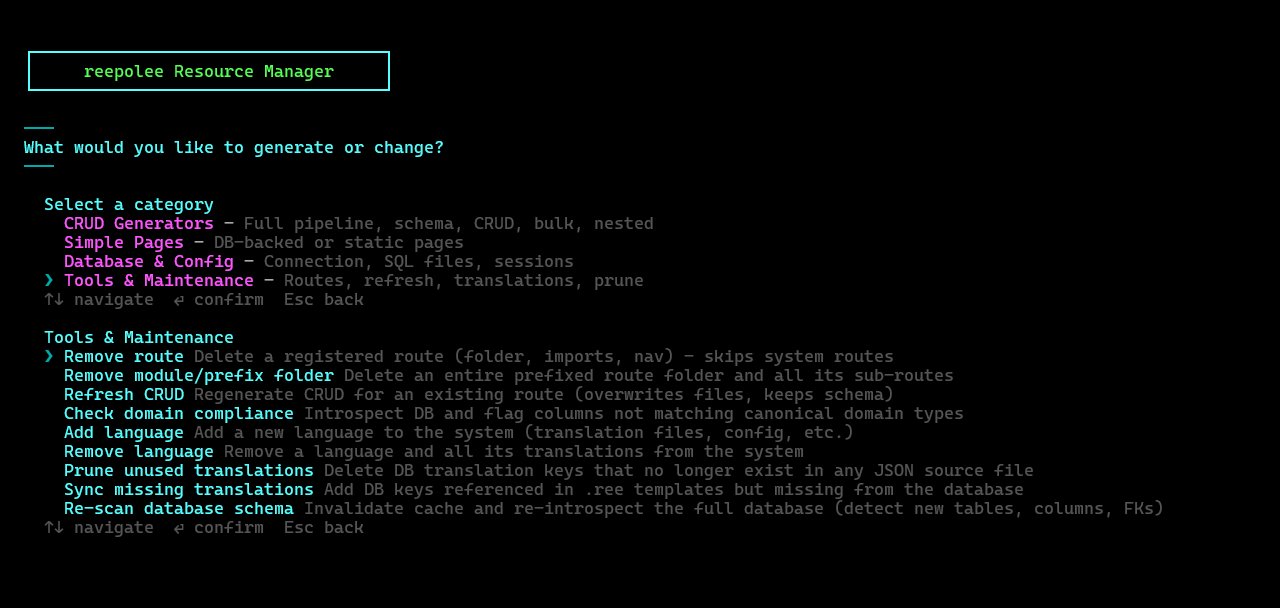
bun reeman writes the boilerplate and edits apps/main/routes.ts for you. There is no single "add route" command - a route is added whenever you generate one, and removed from the Tools & Maintenance group:
- Add a route - use the Simple Pages or CRUD Generators group. Simple Table Page / Simple Page generates a
apps/main/<name>/index.ts+index.reepair from the shipped template and inserts aRouteDefinitionentry (optionally under a prefix such asadmin, so the entry getsmodule: "admin"and is gated and grouped automatically). Single table / All tables runs the schema-introspection + CRUD generator and adds theRouteDefinitionfor each generated module (see Generators). - Remove a route - Tools & Maintenance -> Remove route deletes the route folder, removes its
importfromapps/main/routes.ts, and removes itsRouteDefinitionentry. System routes (/login,/profile, etc.) are skipped to prevent accidents. Remove module/prefix folder in the same group deletes an entire prefixed route folder and all its sub-routes.
You can always edit apps/main/routes.ts by hand; reeman just keeps the housekeeping in one place.