Translations
Reepolee stores UI translations in co-located {locale}.json files. There is no translations table and no translation SQL - the JSON files are the source of truth, the same file-first mechanism ReeWeb uses. create_ctx() resolves the active locale into ctx.translations, render() exposes that object to the template as props.translations, and templates read strings with the {_ } / {- } / {@ } lookup tags ({@ } renders the value through markdown).
Manage translations through the JSON files. Edit the file directly, or use the
/translationsadmin UI in the reeman app,bun reeman sync-translations,insert-translations, orprune-translations.
This page covers the file layout, how request handling reads it, and how to keep files in sync with templates. For per-locale record content editing (the in-form locale tab editor, copy-locale with hash tracking), see Localized Content. For moving curated translations in and out of the project as transport bundles (export English sources, import translated bundles, install archived locales), see Locale Archives & Bundles.
Strings are namespaced by where they are consumed. Route-specific strings live under the route's namespace (its directory path), while global strings live in the special root namespace at the repository root. A login route therefore sees both its own strings and the global strings in the same ctx.translations object.
File Layout
A translation file is a JSON file named after a lowercase BCP 47 locale code (en-us.json, sl-si.json). Files are discovered under the app trees (apps/main/, apps/reeman/, apps/reeqa/) and the shared platform/ tree, and the directory they sit in - relative to that tree - names their namespace:
apps/main/
└── home/
    └── locales/
        └── en-us.json          ← English, home namespace

platform/
└── auth/
    └── login/
        └── locales/
            ├── en-us.json      ← English, auth.login namespace
            └── sl-si.json      ← Slovenian, auth.login namespace
A namespace resolves to the same path under whichever tree owns it - auth.login resolves to platform/auth/login/, so the shared auth pages translate identically from every app. For a given namespace and locale the loader accepts either the adjacent file or a locales/ subdirectory - platform/auth/login/locales/{locale}.json works the same as platform/auth/login/{locale}.json. Having both layouts for the same namespace and locale is an error, so pick one and stay consistent. Root fallback strings use the same layout at the repository root ({locale}.json or locales/{locale}.json).
Files are kept sorted (alphabetical keys), tab-indented, and terminated by a newline - the file helpers enforce this on generated edits.
Key Organization
Each JSON file is a nested object whose dotted keys are what templates reference. A root en-us.json looks like:
{
    "actions": {
        "save": "Save",
        "delete": "Delete"
    },
    "ui": {
        "title": "Welcome"
    },
    "nav": {
        "home": "Home"
    }
}
create_ctx() merges the active locale's root strings (routes.*) with the route's own namespace on top, so a route can override a global key locally while inheriting everything it doesn't override. A route-level key wins over the root-level key of the same path.
Conventions for Keys
| Key family | Contains | Common consumer |
|---|---|---|
ui | Headings, body copy, page title, descriptive labels | {_ ui.title }, {_ ui.* } |
actions | Button text - submit, save, cancel, delete, back | {_ actions.* } |
errors | Validation messages by rule key | validate(data, ctx.translations.errors) |
messages | Toast and confirmation strings | Toast payloads |
fields | Per-field metadata (field_name.label, etc.) | Form templates |
search | Search-form copy | List page templates |
selectors | Dropdown options (yes/no, per-page) | List page templates |
nav | Navigation menu entries | Layout templates, nav_label() helper |
For your own keys, prefer snake_case values like record_updated and email_not_sent. Keep the key names lowercase and punctuation-free.
Reading Translations in Handlers
create_ctx(req, import.meta.dir) from $lib/request_context resolves the active locale and gives handlers the merged translation object on ctx.translations.
import { render } from "$lib/render";
import { create_ctx } from "$lib/request_context";

export async function get_auth_login(req: BunRequest): Promise<Response> {
    const ctx = await create_ctx(req, import.meta.dir);
    return render("form", { data: { action: "/login" }, ctx });
}
Passing ctx to render() is enough. render() exposes ctx.translations as props.translations and templates read it with {_ ui.title }, {_ fields.email.label }, and similar lookup tags.
If a handler needs a string for validation or a toast, read ctx.translations directly:
const [errors, valid_data] = validate(data, ctx.translations.errors);
The Files Are the Source of Truth
The {locale}.json files are authoritative. If a key is missing in a non-default locale, the loader fills the gap with a braced placeholder such as {title} so the omission is obvious during testing.
The merge rules in lib/i18n.ts are intentionally simple:
- Missing keys in non-default locales are replaced with a visible placeholder.
route_nameis never inherited from another locale.- The loader is silent if no files exist yet, which keeps a fresh project from crashing during bootstrap.
To change a translation:
- Edit the namespace JSON file directly.
- Use the
/translationsadmin UI (in the reeman app). - Run
bun reeman sync-translations --translateto fill missing keys across locales. - In dev mode, Cmd+Shift+Click any
{_ }string in the browser to edit it in place - see Dev Inspector.
The Translations Admin Module
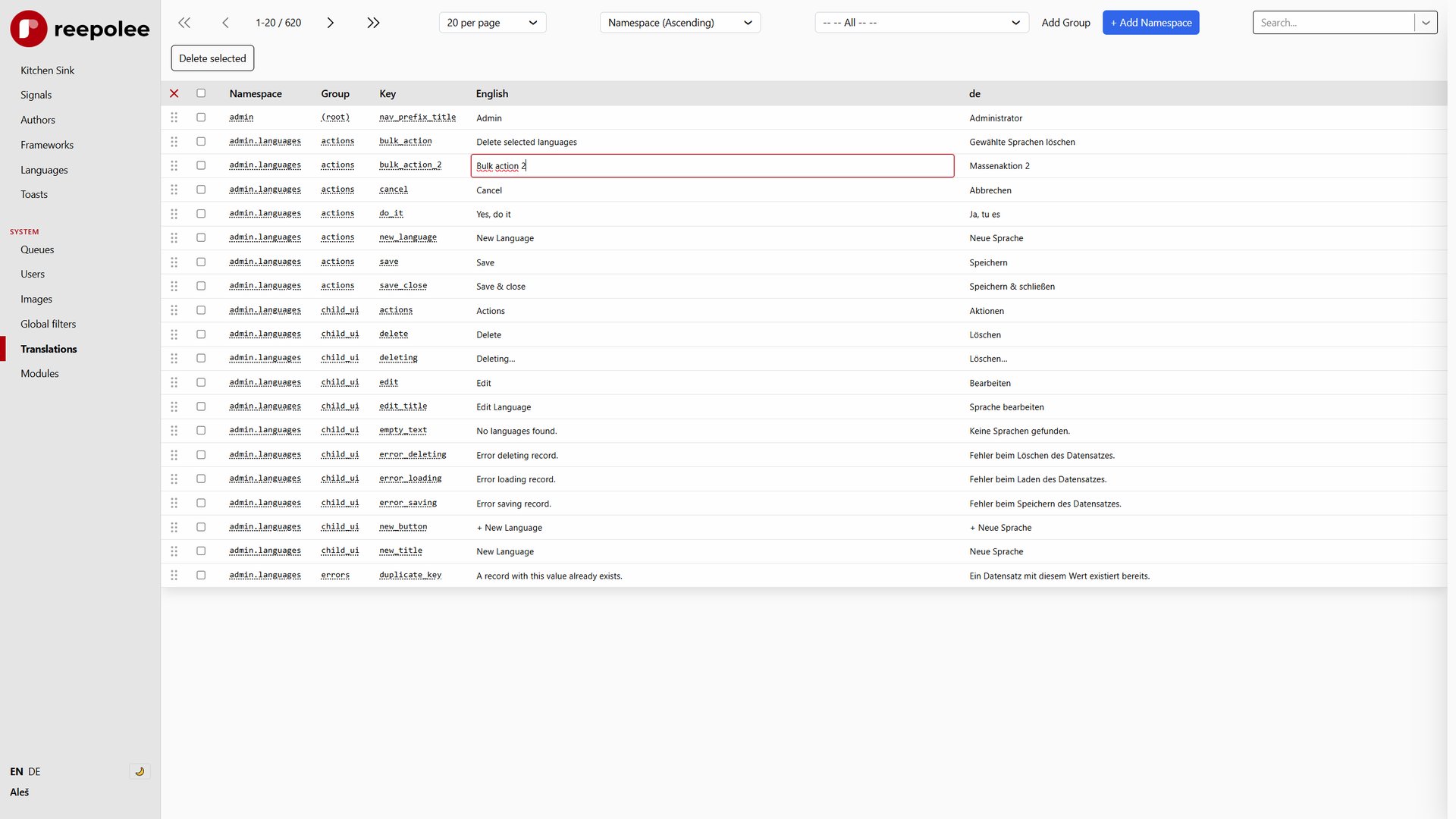
The /translations route is a CRUD UI over the JSON files. It lets an operator browse namespaces, edit strings, add new keys, and delete obsolete ones. Each save rewrites the underlying JSON files, and the running server reloads translation state so the change is visible immediately without a restart.
This is the primary workflow for day-to-day translation edits. The JSON files on disk are the only artifact - nothing derived is emitted.
Pluralization
For counts, a single translation string can hold all plural forms separated by pipes, and the plural() helper in $lib/format picks the right one using Intl.PluralRules:
import { plural } from "$lib/format";

// translation value: "no items|one item|{count} items|{count} items|{count} items"
plural(props.messages.item_count, count, locale); // -> "3 items"
The helper selects the correct plural category and substitutes {count}. format_bulk_delete_message() builds on this for the generated bulk-delete handlers.
Synchronising Keys Across Locales
sync-translations scans the JSON files for keys that exist in one locale but not another, translates the missing values with an LLM, and writes the results back to the files:
bun reeman sync-translations --translate
This is the non-interactive way to keep locales aligned. It edits the JSON files in place - there is no database step and no manual copy.
Excluded Translations
sync-translations treats a key as untranslated when the locale's value is missing, ::missing::-prefixed, or identical to the English value - the last one being the heuristic for "copied from the default locale but never actually translated." Some keys are intentionally identical across locales, though: a language's own native name (English is "English" in every locale), short unit and abbreviation strings, and the cross-locale name data that add-locale populates with its own dedicated AI calls. config/excluded_translations.ts lists the key-path prefixes that skip the identical-value check:
export const excluded_translation_prefixes: string[] = [
    "ui.language_name",
    "ui.language_names",
    "ui.language_names_to",
    "ui.seconds",
    "ui.ttl",
];
extract_untranslated() in $lib/translation_merge is key-path aware: for an excluded prefix it flags a key only when it's missing or ::missing::-prefixed, never because its value matches English. Without the exclusion, these keys would be re-sent to the AI on every sync run even though nothing is actually untranslated.
Maintenance: Pruning and Filling Gaps
The reeman tools keep the JSON files aligned with what the templates actually reference. They scan .ree templates for {_ ... } / {- ... } lookups, compare the references with the files, and write the changes back to the JSON files in place.
| reeman command | Direction | Output |
|---|---|---|
| Prune unused translations | File keys not referenced by any template | Deletes the orphaned keys from the JSON files |
| Sync missing translations | Template refs not present in the files | Adds the missing keys to every configured locale file |
These are the insert-translations and prune-translations reeman subcommands. They edit the JSON files directly - there is no intermediate .sql file.
Adding New Strings
The flow for adding a new translation key is:
- Reference the key in the template with
{_ your_new_key }or{- your_new_key }. - Add the key to the namespace's
{locale}.jsonfile for each locale, or use Sync missing translations to scaffold the missing keys. - Fill the values through the
/translationsadmin UI or by editing the JSON directly.
For a global string that should appear on every page, use the root namespace (the {locale}.json at the repository root). For a route-specific string, use that route's namespace.
Reloading Translations in Development
Translations are loaded from the JSON files at startup and reloaded when the admin UI or sync tooling writes new values. If you change the files outside those flows, reload the translation repository and rebuild the route maps, or restart the server.
import { translations } from "$lib/i18n";
import { reload_route_maps } from "$lib/route_map";

export async function get_dev_reload_translations(req: BunRequest): Promise<Response> {
    await translations.reload();
    reload_route_maps(translations.all);
    return new Response("Reloaded");
}
The running server also exposes the hot-reload endpoint POST /__reload-translations, which the generators and queue worker use after writing new translation files. It is disabled by default - see Internal Admin Endpoints for how to enable it.
Editor Tooling
The ree Templates VS Code extension reads the {locale}.json files next to each template and wires them into the editor - completion, validation, and inline previews for {_ ... } / {- ... } / {@ ... } tags, with no configuration as long as the JSON sits beside the template. The co-located files are the same artifact the server reads, so there is nothing extra to export or keep in sync - edit a JSON file and both the server and the editor see the change.
The extension's translation support is configured through the ree section of package.json (translation_provider: "route-json" and translation_roots). See Editor & LSP for the full settings and capabilities.