Sessions & KV
Reepolee stores authentication sessions behind a tiny key-value abstraction. Every backend implements the same SessionStore interface - kv_set, kv_get, kv_delete, kv_has, plus a handful of session helpers - and that's the entire surface area between the auth code and the storage layer.
platform/auth/session_store.ts is a dynamic barrel: at startup it reads the SESSION_STORE env var and dynamically imports ./session_store_sqlite (the default) or ./session_store_redis. The auth code imports from the barrel and never sees which backend is loaded - platform/auth/types.ts declares the shared SessionStore interface both implementations satisfy.
The default backend is the same SQL database the rest of the application uses. Sessions live in a sessions table with two columns. Set SESSION_STORE=redis (plus REDIS_ENABLED=true and REDIS_URL) to switch to Bun's built-in Redis client without changing any auth code.
The sessions Table
The schema is intentionally minimal:
CREATE TABLE sessions (
    session_code TEXT NOT NULL,
    session_json TEXT NOT NULL,
    PRIMARY KEY (session_code)
);
session_code is a UUID v7 generated by uuid_v7(); session_json is the JSON-serialised session data. Storing the full session as JSON keeps the schema flexible - adding a new field to the session shape doesn't require a migration.
For MySQL, the column types are VARCHAR(36) and TEXT respectively, but the schema is otherwise identical.
The KV Functions
The four KV functions are implemented separately for each SQL dialect. platform/auth/session_store.ts inspects the active DB_CONNECTION_STRING and loads session_store_mysql.ts for MySQL or session_store_sqlite.ts otherwise. The shared SessionStore interface keeps the auth code dialect-neutral; SQL syntax is not normalised by Bun.
import { db } from "$config/db";

async function kv_set(key: string, value: Session_data): Promise<void> {
    const json = JSON.stringify(value);
    await db`
        INSERT INTO sessions (session_code, session_json)
        VALUES (${key}, ${json})
        ON CONFLICT(session_code) DO UPDATE SET session_json = ${json}
    `;
}

async function kv_get(key: string): Promise<Session_data | null> {
    const [row] = await db`SELECT session_json FROM sessions WHERE session_code = ${key}`;
    return row ? (JSON.parse(row.session_json) as Session_data) : null;
}

async function kv_delete(key: string): Promise<void> {
    await db`DELETE FROM sessions WHERE session_code = ${key}`;
}

async function kv_has(key: string): Promise<boolean> {
    const [row] = await db`SELECT 1 FROM sessions WHERE session_code = ${key}`;
    return !!row;
}
That example is the SQLite implementation (session_store_sqlite.ts); its MySQL counterpart keeps the same kv_get, kv_delete, and kv_has queries but uses the MySQL upsert shown below.
The SQLite implementation uses ON CONFLICT:
INSERT INTO sessions (session_code, session_json)
VALUES (?, ?)
ON CONFLICT(session_code) DO UPDATE SET session_json = ?;
The MySQL implementation in session_store_mysql.ts uses the corresponding MySQL syntax:
INSERT INTO sessions (session_code, session_json)
VALUES (?, ?)
ON DUPLICATE KEY UPDATE session_json = ?;
The functions aren't individually exported - each dialect module collects them in a default object that satisfies SessionStore from ./types. The barrel destructures whichever default it loaded and re-exports the names the auth code imports.
The Session_data Shape
The session payload is whatever JSON-serialisable shape your auth flow needs. The default shipped with Reepolee:
// platform/auth/types.ts
export interface Session_data {
    user_id: number;
    email: string;
    name: string;
    nickname: string;
    avatar_filename: string;
    display_name: string;
    modules_tags: string; // comma-separated module codes, e.g. "user,admin"
    created_at: number; // Temporal.Now.instant().epochMilliseconds at session creation
}
modules_tags is a comma-separated string mirroring the users.modules_tags column. Authorization checks (require_module_mw("admin")) split on commas and look for a match - see Authorization.
created_at is an epoch-milliseconds timestamp from Temporal.Now.instant(), used for TTL checks. Adding new fields to the session shape is just adding them to this interface; no migration is needed because the storage is JSON.
Session Helpers
Each backend (session_store_sqlite.ts, session_store_redis.ts) defines the same small set of helpers and bundles them into a single default object:
const SESSION_TTL_MS = 1000 * 60 * 60 * 24 * 7; // 7 days

function generate_session_id(): string {
    return uuid_v7();
}

async function create_session(session_id: string, data: Omit<Session_data, "created_at">): Promise<void> {
    await kv_set(session_id, { ...data, created_at: Temporal.Now.instant().epochMilliseconds });
}

async function get_session(session_id: string): Promise<Session_data | null> {
    const session = await kv_get(session_id);
    if (!session) return null;

    if (Temporal.Now.instant().epochMilliseconds - session.created_at > SESSION_TTL_MS) {
        await kv_delete(session_id);
        return null;
    }

    return session;
}

async function destroy_session(session_id: string): Promise<void> {
    await kv_delete(session_id);
}

async function refresh_session(session_id: string, partial: Partial<Omit<Session_data, "created_at">>): Promise<void> {
    const existing = await kv_get(session_id);
    if (!existing) return;
    await kv_set(session_id, { ...existing, ...partial });
}

export default {
    kv_get,
    kv_delete,
    kv_has,
    create_session,
    get_session,
    destroy_session,
    refresh_session,
    generate_session_id,
} satisfies SessionStore;
A few things to highlight:
get_sessionchecks the TTL on every read and deletes expired sessions lazily. There is no background sweeper job; the cleanup happens whenever the session is queried after expiry.refresh_sessionis a partial update - it merges the new fields into the existing session and leavescreated_atuntouched. Used by the profile flow so the session reflects the new display name immediately.- The TTL is a constant. Change
SESSION_TTL_MSto extend or shorten it. Existing sessions are checked against the new value on the next read; you don't need to invalidate anything.
The auth middleware and the session-aware render context call these helpers - never the raw kv_* functions. That's what makes the storage backend swappable.
Swapping to Redis
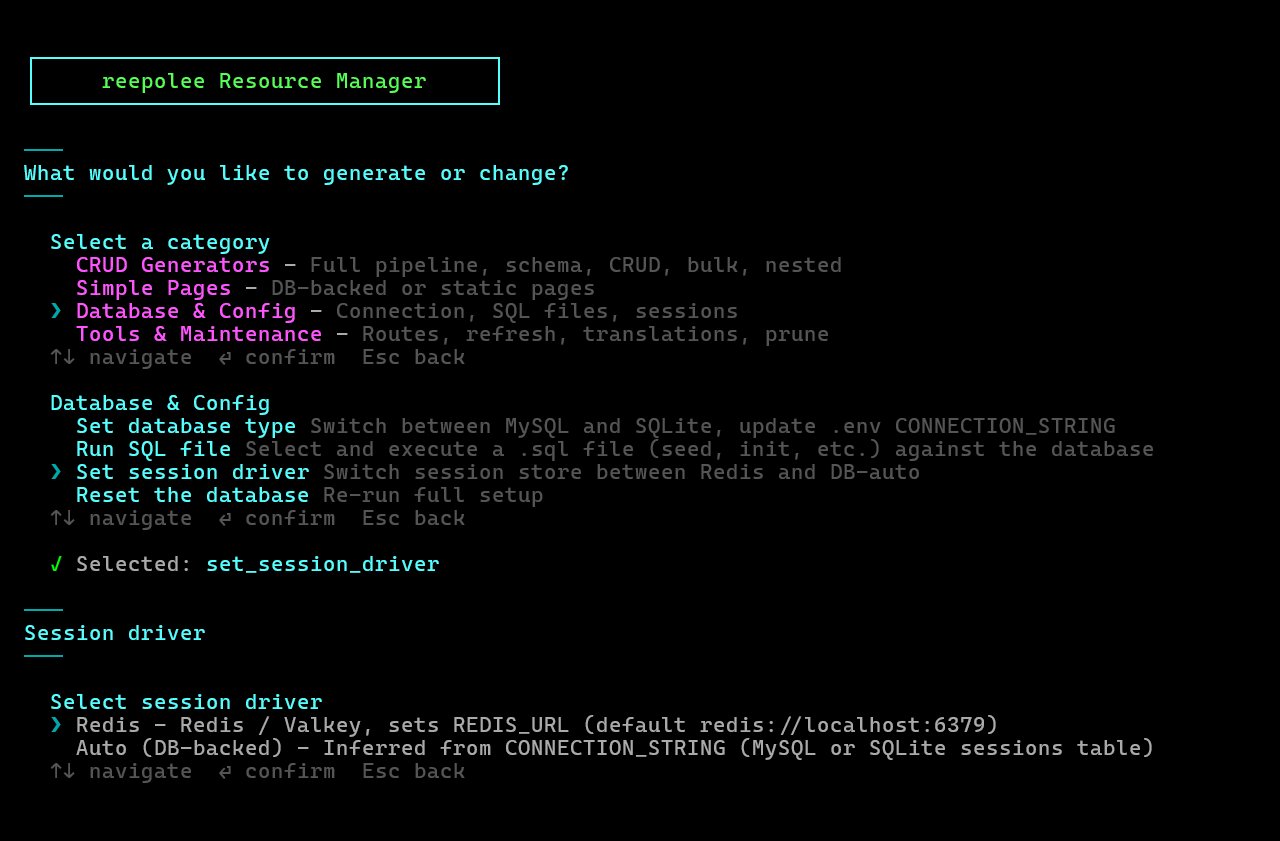
The Redis backend ships in platform/auth/session_store_redis.ts. The fastest way to switch is reeman:
bun reeman
# pick "Set session driver" → Redis or SQL
The same toggle is one of the steps in the Quick Start flow on a fresh project. Under the hood it's three env vars - Redis is opt-in, so both the switch and the URL must be set:
SESSION_STORE=redis
REDIS_ENABLED=true
REDIS_URL=redis://localhost:6379
The barrel picks these up at startup and dynamically imports the Redis store instead of the SQL one. If Redis isn't available (REDIS_ENABLED off or no REDIS_URL), the Redis store fails and the barrel falls back to the SQL store. No code change required.
The shipped Redis implementation:
// platform/auth/session_store_redis.ts
import type { Session_data, SessionStore } from "./types";

const SESSION_TTL_S = 60 * 60 * 24 * 7; // 7 days
const KEY_PREFIX = "session:";

const redis = new RedisClient(Bun.env.REDIS_URL!.trim());

async function kv_set(key: string, value: Session_data): Promise<void> {
    await redis.set(`${KEY_PREFIX}${key}`, JSON.stringify(value), "EX", SESSION_TTL_S);
}

async function kv_get(key: string): Promise<Session_data | null> {
    const raw = await redis.get(`${KEY_PREFIX}${key}`);
    return raw ? (JSON.parse(raw) as Session_data) : null;
}

async function kv_delete(key: string): Promise<void> {
    await redis.del(`${KEY_PREFIX}${key}`);
}

async function kv_has(key: string): Promise<boolean> {
    return (await redis.exists(`${KEY_PREFIX}${key}`)) === 1;
}

export default {
    /* …session helpers… */
} satisfies SessionStore;
Three differences from the SQL version worth noting:
kv_setsets an expiry directly on Redis (EXoption) so Redis evicts expired keys automatically. The TTL check on read still runs, but rarely fires anything in practice.- The key is namespaced with
session:so other Redis-backed features can share the same instance without collisions. kv_hasusesEXISTS, which is cheaper than fetching the value and discarding it.
REDIS_ENABLED is the switch: only "true" or "on" enables Redis, and the Redis store refuses to load without it together with a real REDIS_URL. Anything else (a managed Redis URL, a Valkey instance) just goes in the env var - no library to install.
Other Uses for the KV Layer
The KV abstraction isn't auth-specific. Anywhere you need a small string-keyed store - caching expensive queries, rate-limiting tokens, ephemeral state for multi-step flows - you can reuse the same pattern. Define your own interface CacheEntry { ... }, write a few kv_*-shaped functions for it, and the rest of the application has the same swap-to-Redis story without any extra plumbing.
For larger key spaces or hotter access patterns, Redis becomes the right backend earlier. For the typical "small handful of session reads per request" load, the SQL backend handles plenty of traffic - the join cost is zero (the lookup is a single primary-key fetch) and the database is already there.