Toast Notifications
After a successful create, update, or delete, the user needs feedback - but the response is a redirect, so there's no template to render a "Saved!" banner into. Reepolee's solution is a cookie-based toast: the handler attaches a small cookie to the redirect, the next page load reads the cookie, renders the toast on the page, and immediately expires the cookie so it doesn't show again.
The pattern survives page refreshes, works without JavaScript (the toast simply doesn't appear, but the redirect still succeeds), and never accumulates state on the server. Everything that needs to be remembered is in the cookie itself.
Creating a Toast
create_toast_cookie() from $lib/cookies builds the cookie. It takes a small options object:
import { create_toast_cookie } from "$lib/cookies";

const cookie = create_toast_cookie({
    record_id: record.id,
    feature: "users",
    message: ctx.translations.messages.record_updated,
    type: "green",
    user: ctx.user?.display_name,
});
| Option | Type | Default | Description |
|---|---|---|---|
record_id | number | string | - | Used to build the cookie name so multiple toasts can coexist |
feature | string | - | Feature name (e.g. "users"); included in the toast payload |
message | string | "record_updated" | The text shown to the user |
type | string | "yellow" | "green" (success), "red" (error), "yellow" (warning), or anything else (neutral) |
duration | number | 2500 | Milliseconds the toast stays visible |
user | string | - | If provided, the current user's display name is included on the toast |
create_toast_cookie returns a Cookie object whose toString() produces the Set-Cookie header value.
Attaching the Cookie to a Redirect
Response.redirect() doesn't let you attach extra headers, so toast-bearing redirects are built manually:
const cookie = create_toast_cookie({
    record_id: record.id,
    feature: "users",
    message: ctx.translations.messages.record_updated,
    type: "green",
    user: ctx.user?.display_name,
});

const headers = new Headers({ Location: "/users" });
headers.append("Set-Cookie", cookie.toString());

return new Response(null, { status: 303, headers });
Status 303 ensures the browser follows the redirect with a GET regardless of the original method. The body is null. Any number of Set-Cookie headers can be appended - pair multiple toasts with a session cookie if you need to.
How the Toast Is Displayed
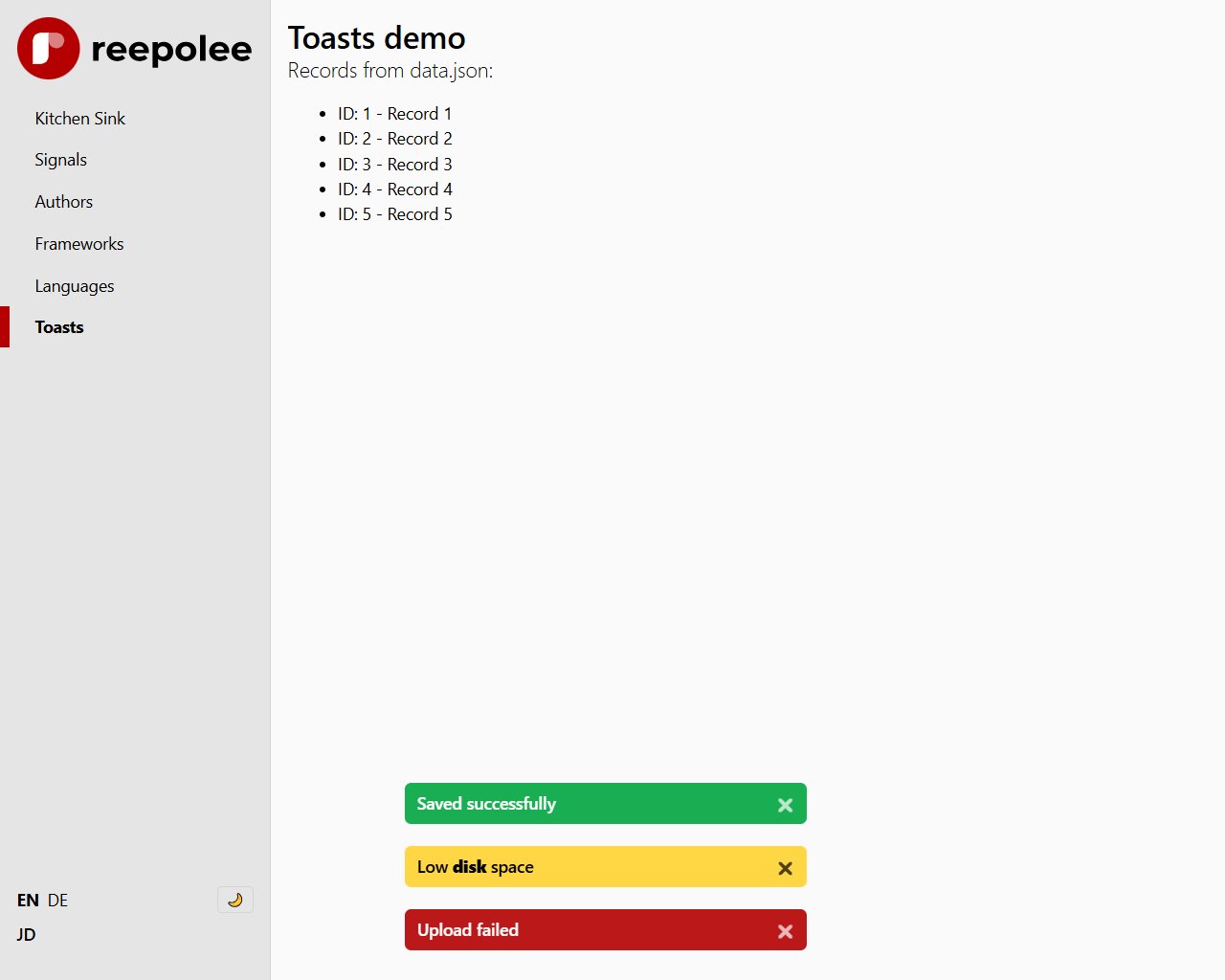
The layout includes the <toasts-area> custom element once, near the end of <body>, and renders each toast directly inside it:
<toasts-area id="toasts-area">
    {#each props.toasts as toast}
        <div id="toast-{= toast.key }" class="animate-in-top" style="--toast-duration:{= toast.duration ?? 3000 }ms">
            <div class="... {= toast_class }">
                <div class="pr-6">{= toast.message } {~ toast.user ? `(${toast.user})` : "" }</div>
                <a href="#toast-{= toast.key }" aria-label="Close toast">🗙</a>
            </div>
        </div>
    {/each}
</toasts-area>
props.toasts is populated by create_ctx() from every cookie with the toast- prefix. Passing that context to render() hands them to the template as props.toasts and adds Set-Cookie: <name>=; Max-Age=0 headers to the response to expire them immediately. The user sees the toast exactly once.
The toast markup is server-rendered HTML, not a client-side script call - the toast is visible in the initial response, no JavaScript required. The close link (href="#toast-{key}") pairs with a CSS :target rule (css/toasts.css) that hides the toast on click - a CSS-only dismiss that needs no JS either. static/web-components/toasts-area.js still defines the <toasts-area> custom element (positioning, stacking, auto-removal after duration), and its add_toast() method is still how client-triggered toasts (below) get added on top of the server-rendered ones.
The toasts-area Element
<toasts-area> is a vanilla custom element in static/web-components/toasts-area.js. It:
- Positions itself fixed at the bottom-centre of the viewport.
- Stacks multiple toasts with a small staggered animation.
- Provides an
add_toast(toast)method (and a globalwindow.add_toastconvenience alias). - Removes each toast automatically when its
durationelapses. - Adds a close button so the user can dismiss a toast early.
The toast object the element accepts:
{
    id: string,           // optional; auto-generated if missing
    type: "green" | "red" | "yellow" | "neutral",
    message: string,      // shown as the toast body
    duration: number,     // ms before auto-dismiss
    user: string,         // optional; appended in parentheses
}
Load the element once in your layout <head>:
<script src="/web-components/toasts-area.js" defer></script>
Triggering Toasts From Client Code
add_toast() is a global function exposed by the element. Any JavaScript on the page can call it to show a toast without involving the server:
add_toast({
    type: "green",
    message: "Copied to clipboard",
    duration: 1500,
});
Useful for things that complete entirely in the browser - clipboard actions, drag-and-drop confirmations, signal-driven UI feedback.
Error Toasts
For failures - a save that succeeded in part but couldn't send the confirmation email, for example - use type: "red" and a longer duration so the user has time to read it:
const cookie = create_toast_cookie({
    record_id: record.id,
    feature: "email",
    message: ctx.translations.errors.email_partial_failure,
    type: "red",
    duration: 6000,
    user: ctx.user?.display_name,
});
If the failure is bad enough that you don't want to redirect at all - for example, validation errors on submit - re-render the form with props.form_errors and the banner component instead of a toast. Toasts are for "the action completed, here's a status update"; the banner is for "the action did not complete, here's why."
Multiple Toasts
The cookie name uses record_id as a discriminator (toast-updated-<record_id>), so attaching two toast cookies with different record IDs in the same response shows two toasts. The <toasts-area> element stacks them with a staggered animation.
If you're attaching multiple toasts deliberately, pass distinct record_id values so the cookie names don't collide. For truly unrelated toasts, the value can be anything unique - a crypto.randomUUID(), a timestamp, the feature name plus a counter.
Without JavaScript
The toast markup is server-rendered, so it appears even with JavaScript disabled - the redirect completes, the toast cookie gets read and expired, and the toast shows on the next page load. The close button also works without JS (it's a plain <a href="#toast-{key}"> matched by a CSS :target rule). The only thing JavaScript adds is the auto-dismiss timer and client-triggered toasts via add_toast() - without it, a toast simply stays on screen until the page next navigates.
For applications where the toast's content matters enough that it shouldn't be missable at all (a payment flow, an account deletion), reach for the banner component inside a real page render instead - it's part of the page content rather than a floating overlay.