Dynamic Translations
Translations live in co-located {locale}.json files - the source of truth (see Translations). Translating by hand through the /translations admin UI is the most reliable path: you see exactly what each language looks like. For projects with many languages or frequent content updates, the AI translation pass fills the gaps automatically, leaving you to review the result rather than type every string.
The automated path is bun reeman sync-translations --translate - it scans the JSON files for keys present in one locale but missing (or still untranslated) in another, translates them via an LLM, and writes the results back to the files. It is non-destructive: already-translated values are left untouched.
Synchronising Translation Keys
When a key exists for one locale but not another - you added an English string, or just added a new locale - sync-translations closes the gap. It scans the JSON files across every namespace, finds keys missing from a locale, AI-translates them, and writes them straight to the files:
bun reeman sync-translations --translate
Because the JSON files are authoritative, there are no SQL rows to edit and no placeholder markers to find and replace - the missing keys are simply added to each locale's file with translated values. Run it whenever you've added strings or a locale and want the other locales filled in.
To find or scaffold keys that templates reference but the files don't have yet, use the Sync missing translations reeman tool, and to remove keys no longer referenced by any template, use Prune unused translations - both edit the JSON files in place. See Translations → Maintenance.
AI Translation Pass
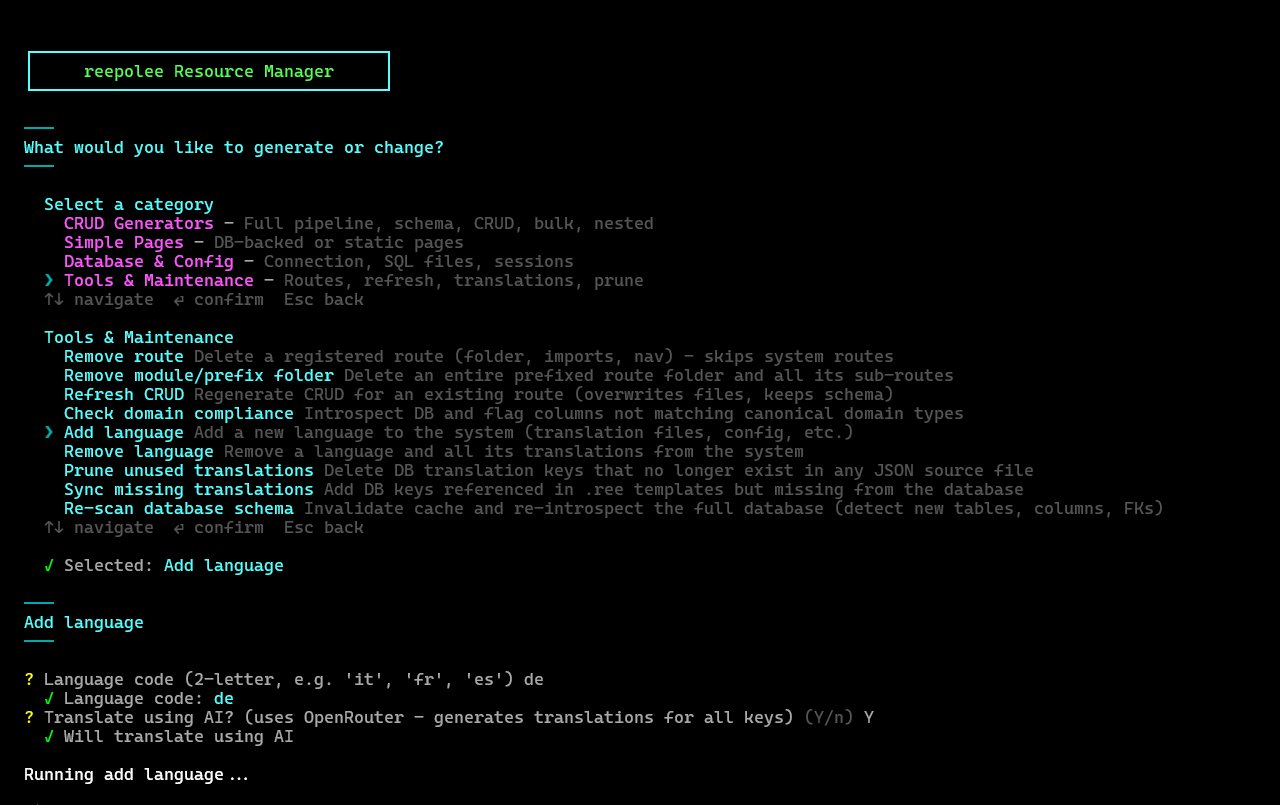
sync-translations --translate is the standalone translation pass. The same --translate flag is also accepted by the resource generators, so a freshly generated module can have its labels translated in the same step:
bun reeman crud users --translate
The pass works across all locales the project supports (from config/supported_locales.ts). It reads the English values from the JSON files, sends them to the LLM, and writes the returned translations back into each locale's files. Only keys that are missing or still hold the English placeholder are sent - already-translated values are left untouched.
Setup
Set exactly one provider key in your .env. The shipped .env.example configures OpenRouter:
OPENROUTER_KEY=...
OPENROUTER_MODEL=your-openrouter-model
You can switch to another backend entirely - see Choosing a Provider below.
Choosing a Provider
generator/ai-provider.ts supports seven providers. Configure exactly one of them; setting zero or more than one provider key is an error. The list below is the validation order, not a fallback chain:
- Ollama - if
OLLAMA_URLis set, a local model is used (setOLLAMA_MODELtoo). - Gemini - if
GEMINI_API_KEYis set. SetGEMINI_MODELwhen this provider is selected. - OpenAI - if
OPENAI_API_KEYis set. SetOPENAI_MODELwhen this provider is selected. - Claude - if
CLAUDE_API_KEYis set. SetCLAUDE_MODELwhen this provider is selected. - xAI Grok - if
XAI_API_KEYis set. SetXAI_MODELwhen this provider is selected. - Hugging Face Inference - if
HF_TOKENis set. Override withHF_URL/HF_MODEL; the language pair (e.g.en-sl) is derived automatically. - OpenRouter - if
OPENROUTER_KEYis set. The shipped.env.examplesetsOPENROUTER_MODEL; set it to pick a different model.
# Configure one provider only:
# OLLAMA_URL=http://localhost:11434
# OLLAMA_MODEL=gemma4:e4b

# Gemini
# GEMINI_API_KEY=...
# GEMINI_MODEL=your-gemini-model

# OpenAI
# OPENAI_API_KEY=...
# OPENAI_MODEL=gpt-4o-mini

# Claude
# CLAUDE_API_KEY=...
# CLAUDE_MODEL=your-claude-model

# xAI Grok
# XAI_API_KEY=...
# XAI_MODEL=your-grok-model

# Hugging Face
# HF_TOKEN=...
# HF_MODEL=Helsinki-NLP/opus-mt

# OpenRouter
# OPENROUTER_KEY=...
# OPENROUTER_MODEL=deepseek/deepseek-chat
All providers feed the same translation pipeline, so switching backends is purely an environment change - replace the current provider settings rather than adding another provider key.
The adapters are not interchangeable endpoints: Ollama, OpenAI, xAI, and OpenRouter use chat-completions-style payloads, but each adapter targets its own service URL and credentials. Claude uses Anthropic's native Messages API, Gemini uses Google's native API, and Hugging Face uses its inference API. Selecting an OpenAI-compatible model therefore still requires the matching provider adapter and key.
What Gets Translated
The AI translates every key in the namespaces it processes, including:
- UI labels, headings, and button text
- Validation error messages
- Field labels and placeholders
- Action names and selectors
route_name values are included in the AI prompt and translated like other keys. Because they become URL segments, review the generated slugs before deploying; the route map slugifies them and does not inherit a missing route_name from another language.
Typical Workflow
The flow for adding a batch of new strings across all locales:
# 1. Add the new keys to the JSON files (e.g. via the Sync missing translations
#    reeman, which scans templates for refs and writes the keys to every locale file).

# 2. Auto-translate everything still untranslated across all locales.
bun reeman sync-translations --translate
sync-translations --translate sends only the keys that are missing or still hold their English placeholder - anything already translated is untouched. After the LLM returns, review the result in the /translations admin UI.
Manual Review After Translation
AI-translated strings are usually correct for the common cases - button labels, field names, short messages. For domain-specific terms, brand names, or context-dependent phrasing, a human review pass is essential.
The /translations admin UI is the place to do it: browse a namespace, compare the languages side by side, and correct anything the model got wrong. Because edits write directly to the JSON files, corrections take effect on the next request (the server reloads translations after each save) - no redeploy.
For terms the AI consistently gets wrong, the simplest fix is to translate those keys by hand once and leave them - sync-translations won't overwrite a key that already has a non-placeholder value.
When Not to Automate
AI translation is appropriate for:
- Bulk-translating a newly added locale
- Filling in 50+ strings after adding a feature
- Keeping translations in sync during early development
AI translation is not appropriate for:
- Marketing copy, landing pages, or any text where tone and voice matter
- Legal disclaimers, terms of service, or anything with legal implications
route_namevalues, unless you have reviewed the generated URL slugs- Any string that, if translated wrong, would confuse or mislead users
For those cases, translate by hand through the admin UI - the AI pass skips keys that already have a translated value.