Profile & Password
Once a user is registered, they need a way to edit their own account. Reepolee ships with two self-service routes: /profile for editing name, nickname, and avatar, and /password for changing the password. Both require an authenticated session, both refresh the session after a successful save so the layout reflects the change immediately, and both confirm the save with a toast notification.
This page covers what's in those handlers, the patterns worth borrowing for your own account-management features, and the small details - old-password preservation, session refresh, avatar upload - that make the flow feel polished.
The Profile Form
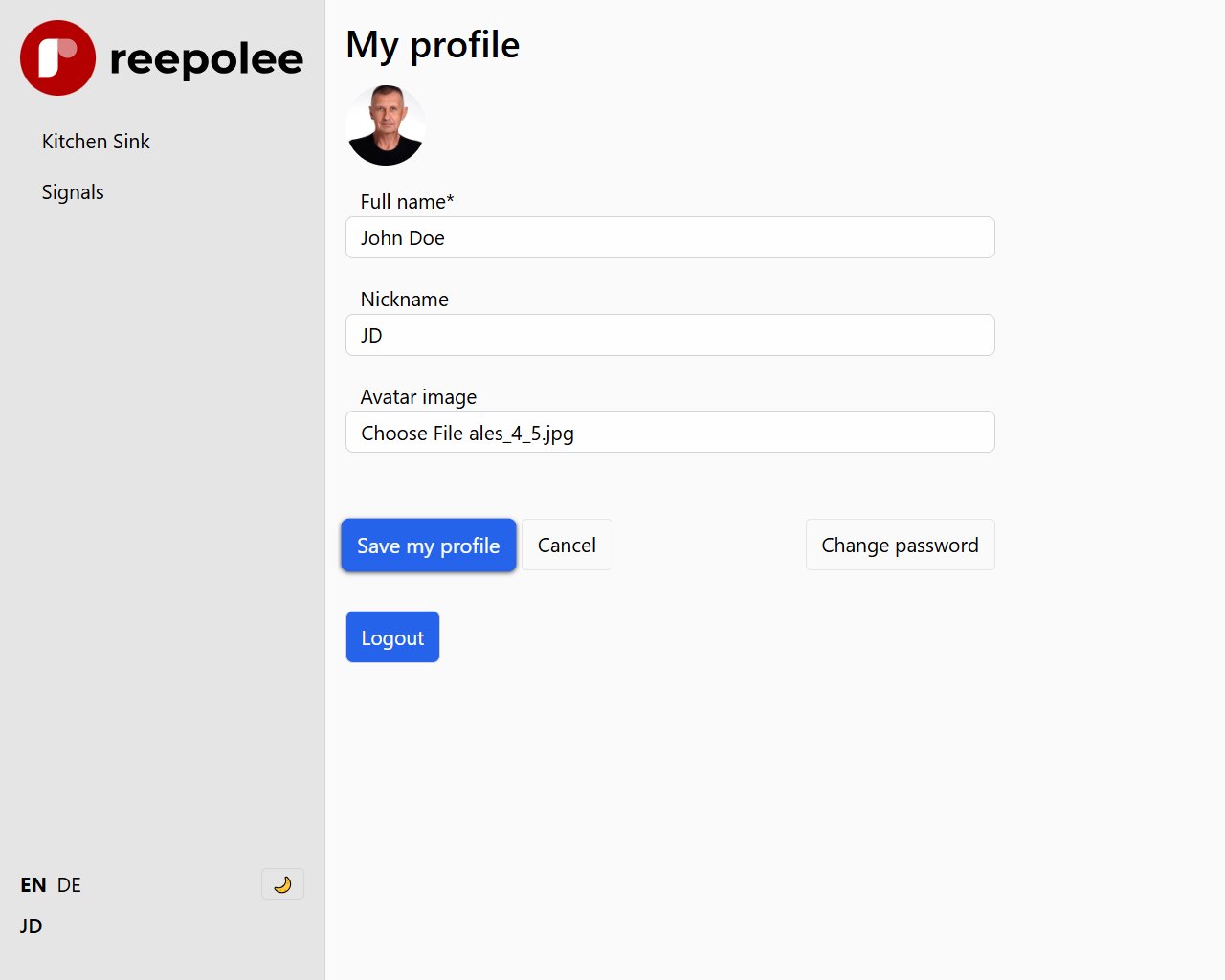
/profile shows a form pre-filled with the current user's name, nickname, modules (read-only for non-admins), and an <input type="file"> for the avatar. The handler reads the form with req.formData() so the file upload works alongside the text fields:
export async function post_auth_profile(req: BunRequest): Promise<Response> {
    const ctx = await create_ctx(req, import.meta.dir);
    const auth_ctx = await resolve_session(req);
    const guard = require_auth(auth_ctx, req);
    if (guard) return guard;

    const form_data = await req.formData();

    const data = {
        name: (form_data.get("name") as string)?.trim() || "",
        nickname: (form_data.get("nickname") as string)?.trim() || "",
        modules_tags: (form_data.get("modules_tags") as string)?.trim() || "",
    };

    const avatar_file = form_data.get("avatar") as File | null;

    const [errors, _valid_data] = validate(data, ctx.translations.errors);
    if (Object.keys(errors).length > 0) {
        return render("auth/profile/form", { data: { ..._valid_data, errors }, ctx });
    }

    let avatar_filename: string | undefined;
    if (avatar_file && avatar_file.size > 0) {
        try {
            avatar_filename = await save_avatar_upload(avatar_file);
        } catch {
            return render("auth/profile/form", {
                data: { ..._valid_data, form_error: "avatar_upload_failed" },
                ctx,
            });
        }
    }

    await update_user_profile(auth_ctx.session!.user_id, {
        name: _valid_data.name,
        nickname: _valid_data.nickname,
        avatar_filename,
    });

    // Refresh session so layout reflects new name/nickname/avatar immediately
    const display_name = _valid_data.nickname || _valid_data.name || auth_ctx.session!.email;
    await refresh_session(auth_ctx.session_id!, {
        name: _valid_data.name,
        nickname: _valid_data.nickname,
        display_name,
        avatar_filename: avatar_filename ?? auth_ctx.session!.avatar_filename,
    });

    return Response.redirect("/profile", 303);
}
Two handlers run side by side here: auth_ctx (from resolve_session) carries the session payload and is what require_auth checks, while ctx (from create_ctx) is the render context with lang, locale, user, translations, and toasts. create_ctx resolves the same session internally, so the two cooperate without an extra DB hit.
The avatar upload pattern is the same as any File Upload - req.formData() exposes both text fields and File objects, and you check file.size > 0 to detect "no file uploaded." save_avatar_upload writes the original file under a UUID name (to S3 when configured, otherwise to static/avatars/) and then calls resize_avatar to emit a 128×128 WebP variant via Bun.Image. The filename it returns - and the one persisted to users.avatar_filename - is the resized one (<uuid>_128_128.webp), so templates can render it without any further URL-building. The full helper, including the S3/disk switch and the resize pipeline, is in File Uploads.
Refreshing the Session After a Save
When the user changes their nickname, the layout's props.user.display_name is read from the session - not from the database. If you only update the database row, the layout still shows the old name until the user logs out and back in.
The fix is one call to refresh_session() after the database write:
const display_name = data.nickname || data.name || auth_ctx.session!.email;
await refresh_session(auth_ctx.session_id!, {
    name: data.name,
    nickname: data.nickname,
    display_name,
    avatar_filename: avatar_filename ?? auth_ctx.session!.avatar_filename,
});
refresh_session(session_id, partial) merges the new fields into the existing session and leaves the rest (including created_at, the TTL anchor) untouched. The next request - including the redirect immediately after this handler - sees the new values.
Changing the Password
/password has three fields: current_password, password, password_confirm. The handler verifies the current password before accepting a new one - without that check, anyone with momentary access to a logged-in browser could silently take over an account:
const user_row = await get_user_by_id(auth_ctx.session!.user_id);

const current_valid = await Bun.password.verify(data.current_password, user_row.hashed_password);
if (!current_valid) {
    return render("auth/password/form", {
        data: { form_error: ctx.translations.errors.incorrect_password },
        ctx,
    });
}

const new_hashed = await Bun.password.hash(data.password);
await update_user_password(auth_ctx.session!.user_id, new_hashed, user_row.hashed_password);
update_user_password(user_id, new_hashed, old_hashed) writes the new hash to hashed_password and saves the old hash to previous_hashed_password. The previous hash is kept for two reasons:
- Recovery: if a user changes their password by accident or under pressure, an admin can roll the column back manually. The hash itself is not reversible, but reverting
hashed_password = previous_hashed_passwordlets the original password work again. - Audit: a record that a password change happened, separate from the current value.
After the password write, the handler creates a fresh session and replaces the cookie. This rotates the session UUID, which has the side effect of invalidating the current session - useful if you ever want to extend this to a "log out everywhere" feature.
const session_cookie = await create_user_session(user_row);
const toast_cookie = create_toast_cookie({
    record_id: 1,
    feature: "",
    message: ctx.translations.messages.successful_save,
    type: "green",
    user: ctx.user?.display_name,
});

const headers = new Headers({ Location: "/" });
headers.append("Set-Cookie", session_cookie.toString());
headers.append("Set-Cookie", toast_cookie.toString());

return new Response(null, { status: 303, headers });
Two Set-Cookie headers go out on the same response - the new session and the toast confirmation. The browser handles them independently, the next page render reads both, and the toast appears once before its cookie expires.
Password Validation
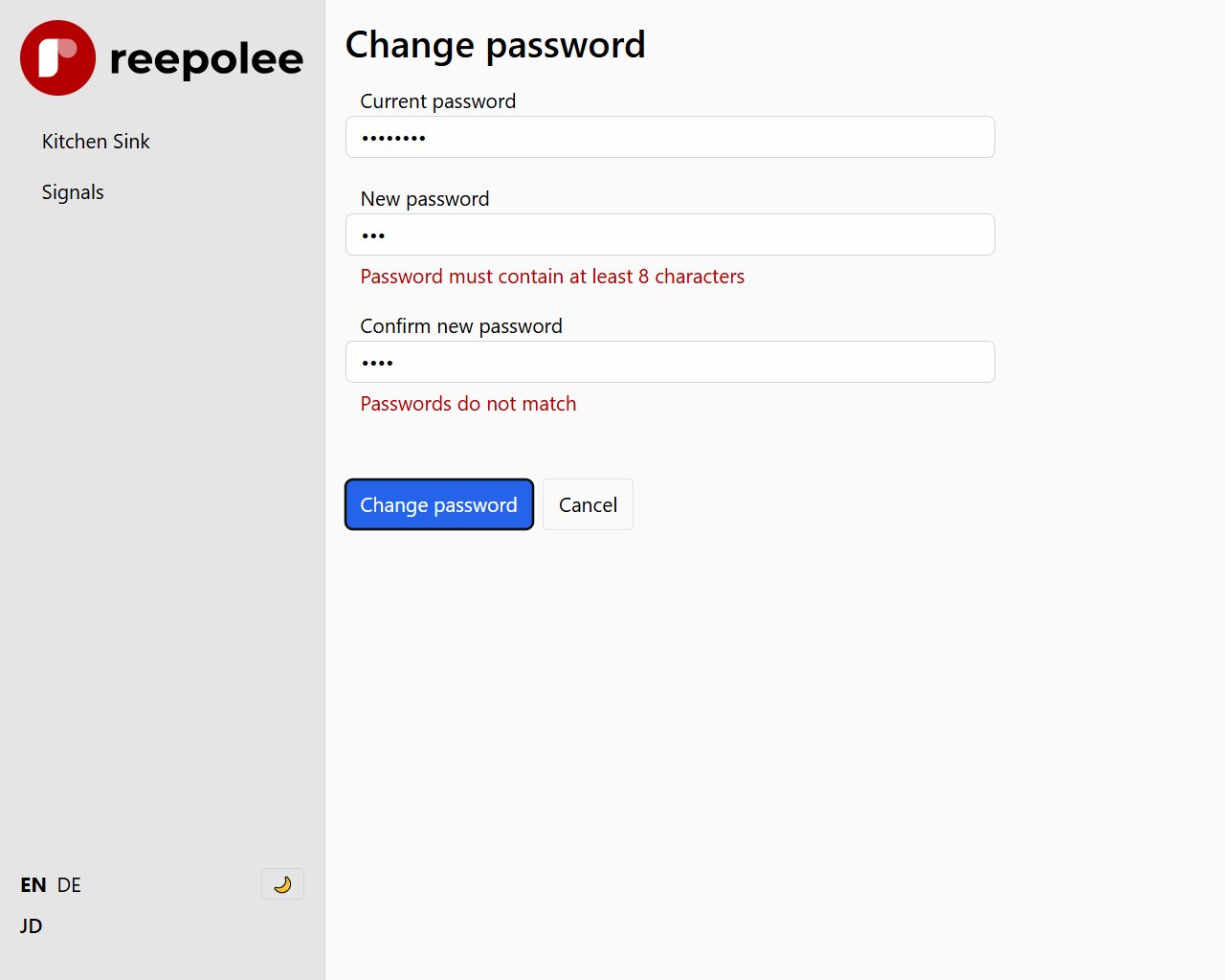
Reepolee does not impose a universal password-strength policy. Each application defines its own rules
in the Zod schema. The shipped default validates the minimum length and confirms that both
new-password values match, displaying each error through the shared FormController and
<validation-error> elements. It does not calculate or display a password-strength score.
The same minimum-length rule applies on password change as on registration. The default is MIN_PASSWORD_LENGTH from config/db_structure.ts - 8 characters in production, 1 in development. Strengthen the rule by extending the Zod schema in validation_server.ts:
export const schema = z
    .object({
        current_password: z.string().min(1, "current_password_required"),
        password: z
            .string()
            .min(MIN_PASSWORD_LENGTH, "password_too_short")
            .regex(/[a-z]/, "password_needs_lowercase")
            .regex(/[A-Z]/, "password_needs_uppercase")
            .regex(/[0-9]/, "password_needs_digit"),
        password_confirm: z.string(),
    })
    .refine((data) => data.password === data.password_confirm, {
        path: ["password_confirm"],
        message: "passwords_dont_match",
    });
Each .regex() produces a translation key the user-facing messages look up. See Validation.
Forgot Password
Reepolee doesn't ship a "forgot password" flow because the invite-only model gives you an admin-mediated alternative: an admin can issue a new invitation code for the user, the user sets a new password through the registration form, and they're back in.
The handler logic is small:
export async function post_auth_reset_user(req: BunRequest): Promise<Response> {
    // require admin
    const auth_ctx = await resolve_session(req);
    const guard = require_module(auth_ctx, "admin");
    if (guard) return guard;

    const user_id = req.params.id;
    const new_code = crypto.randomUUID();

    await db`UPDATE users SET hashed_password = NULL, verified_at = NULL, invitation_code = ${new_code} WHERE id = ${user_id}`;

    return Response.redirect(`/invite/confirm/${new_code}`, 303);
}
Clearing hashed_password and verified_at returns the user to the invited-but-not-registered state. The admin gets the new registration link from the confirm page and shares it.
For a self-service version - the classic "email me a reset link" - the implementation is straightforward: add a public /forgot form that takes an email, look up the user, set a new invitation_code, and email the registration URL. The same verify_and_register_user flow that handles initial registration handles the reset. The only addition is rate-limiting the public form so it can't be used to spam emails.
Account Deletion
Account deletion has no shipped handler because the right approach varies - some applications hard-delete (drop the row), others soft-delete (mark the row inactive and retain the data), others anonymise (replace the email with deleted_<id>@example.invalid and clear personal fields). Pick what fits your data retention requirements.
The minimal shipped pattern is a hard-delete that also destroys the session:
export async function post_auth_profile_delete(req: BunRequest): Promise<Response> {
    const auth_ctx = await resolve_session(req);
    const guard = require_auth(auth_ctx, req);
    if (guard) return guard;

    await db`DELETE FROM users WHERE id = ${auth_ctx.session!.user_id}`;
    await destroy_session(auth_ctx.session_id!);

    const headers = new Headers({
        Location: "/",
        "Clear-Site-Data": "cache, storage",
    });
    headers.append("Set-Cookie", build_clear_cookie().toString());

    return new Response(null, { status: 303, headers });
}
For applications where foreign-key constraints reference the user (orders, posts, audit logs), the hard delete will fail on the first ON DELETE RESTRICT it hits. Either set those constraints to ON DELETE CASCADE (if the dependent records should go too) or ON DELETE SET NULL (if they should outlive the account), or switch to a soft-delete that keeps the row.