Database-First TypeScript CRUD Generator
The Reepolee generator introspects your database schema and produces a complete, working CRUD module - route handlers, SQL queries, form and list templates, Zod validation, and co-located translation JSON files - in a single command. The output is real code you own and can edit freely; the generator is a starting point, not a runtime dependency.
bun reeman crud all
Editing the DDL by hand as your schema grows? Reepolee Studio is a visual editor for these SQL files, installed directly into your app, with live DDL preview and a domain-type palette drawn from your own project.
Via reeman
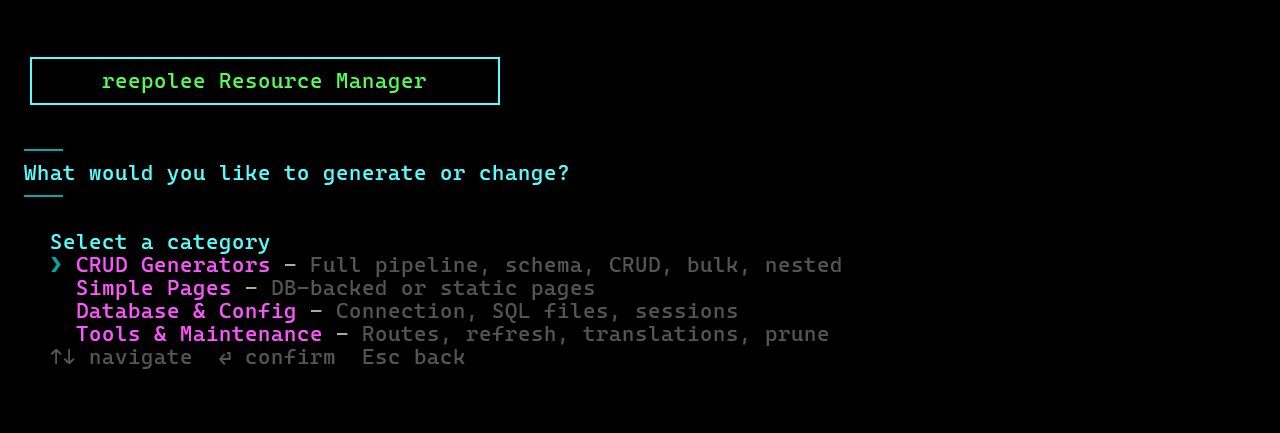
reeman (bun reeman) is the single entry point for the generator - an interactive grouped menu of generators, page scaffolds, database/config tasks, and maintenance actions with no flags to remember:
bun reeman
On a fresh database (no users table yet) it offers to run Quick Start first. After each action you press Enter and return to the menu; choose Exit to quit.
Every action is also reachable as a scripted subcommand - bun reeman <subcommand> [args] - covered in CLI Commands below. The interactive menu and the subcommands call the same underlying functions, so scripting a step never falls behind picking it from the menu.
CRUD Generators
| Menu option | What it does |
|---|---|
| Single table | Full pipeline - schema introspection and CRUD - for one table you pick |
| Schema only | Introspect the DB and write schema files only (no CRUD) |
| Bulk CRUD | Select multiple tables (those without existing CRUD) and batch-generate them |
| All tables | Full pipeline for every table not in IGNORE_TABLES |
| Nested children (auto-detect) | Pick a parent table; reeman auto-discovers its FK children and batch-generates nested CRUD for them |
Simple Pages
| Menu option | What it does |
|---|---|
| Simple Table Page | Scaffold a simple route backed by a DB query (from a template) |
| Simple Page | Scaffold a static page that reads from a local data.json - no database needed |
Database & Config
| Menu option | What it does |
|---|---|
| Set database type | Switch between MySQL and SQLite and update both DEV_CONNECTION_STRING and TEST_CONNECTION_STRING in .env |
| Run SQL file | Pick and execute a .sql file against the database (lists sql/<dialect>/ first - see Schema & Initialization) |
| DATA to SQL | Convert JSON, XLS, or XLSX into a new table - writes paired sql/mysql/NN-<slug>.sql + sql/sqlite/NN-<slug>.sql with system columns (id, display, created_at, updated_at, archive fields) and seed INSERT statements. Columns are inferred from the data and normalized through the canonical domain types. See DATA to SQL below. |
| Upload image (disk/URL) | Process a local file or remote URL through the image pipeline (crop-free, the same processor the web editor uses) and write the resulting URL into <table>.<column> WHERE id = <id> - useful for seeding or backfilling image fields without the browser editor |
| Set session driver | Switch the session store between Redis and the DB-backed default |
| Quick Start / Reset the database | Guided setup - DB type → run SQL file → session driver → admin user. Shown as "Reset the database" once a users table exists |
Tools & Maintenance
Route management lives here too, alongside the schema and translation maintenance tools:
| Menu option | What it does |
|---|---|
| Remove route | Delete a registered route - folder, imports, and nav entry (skips system routes) |
| Remove module/prefix folder | Delete an entire prefixed route folder and all its sub-routes |
| Move route | Move a standalone CRUD route between the root and a module prefix. Reeman regenerates the destination route from its config.ts, preserves translations, then removes the old route. Nested routes and routes with nested children cannot move independently. |
| Refresh CRUD | Refresh generated field sections from the current schema. Opening a route in Reeman first refreshes its editable schema metadata from the live DDL. Route settings, grid visibility, widths, classes, filters, pagination, render strategy, and template-tag mode are edited in the route's config.ts. |
| Check domain compliance | Audit column types against the canonical domain types and report deviations to migrate |
| Add locale | Add a locale to config/supported_locales.ts, generate stub translations, and optionally run the AI translation pass (providers) |
| Remove locale | Remove a locale from the project - strips it from config/supported_locales.ts, deletes its {locale}.json files, and cleans localized route maps |
| Prune unused translations | Scan templates for {= … } refs and delete JSON keys no longer referenced (details) |
| Sync missing translations | Scan templates for refs missing from the JSON files and add them to every locale file (details) |
The CRUD flows prompt interactively for options like prefix, parent, and index-grid columns where relevant. For scripted runs with --prefix, --parent, --pagination, or --grid-columns, use the CLI below.
CLI Commands
All generator commands go through bun reeman <subcommand>:
bun reeman schema <table> [--grid-columns <a,b,c>] # introspect one table and write schema files only
bun reeman schema all-tables                      # introspect every table
bun reeman crud <table> [--grid-columns <a,b,c>]  # full pipeline: schema + CRUD for one table
bun reeman crud all                               # full pipeline: schema + CRUD for every table (alias: all-tables)
bun reeman bulk <table...>                        # generate CRUD for a specific set of tables (always forces overwrite)
bun reeman refresh-crud <table> [--mode fields]       # refresh marked form and index field sections
bun reeman create_bread --from <schema.json> [--prefix <dir>] [--route-name <name>]  # generate a BREAD resource from a synthetic schema (non-DB, store.ts stub)
bun reeman create_localized_bread --from <schema.json> [--prefix <dir>] [--route-name <name>]  # same, but the store holds content per locale (locale-tabs editor)
bun reeman json-to-sql <path> --table <name> [--slug <slug>]
create_bread and create_localized_bread generate CRUD-shaped resources backed by a store.ts stub instead of a database table - see BREAD Resources for the synthetic schema format, the store contract, and implementation examples.
bun reeman spreadsheet-to-sql <path.xls|path.xlsx> --table <name> [--slug <slug>] [--sheet <name>]
json-to-sql and spreadsheet-to-sql convert JSON or spreadsheet data into paired MySQL/SQLite SQL files - see DATA to SQL below.
For prefixed routes (e.g. /admin/...), bun reeman crud <table> --prefix admin is the invocation - see Prefixed Routes below.
schema and crud are intentionally separate steps so you can review the introspected types before committing to the generated UI - schema only introspects, crud runs the full pipeline (schema + CRUD generation) for one table or, with all/all-tables, for every table.
Run bun reeman --help (or bun reeman help) for the full command reference, including the route, database/config, locale, and translation subcommands (remove-route, set-db-type, upload-image, add-locale, sync-translations, check-domain-compliance, prune-translations, insert-translations, and more). Every subcommand run this way is also appended to .reepolee/reeman.sh / .reepolee/reeman.ps1, so a scripted session can be replayed later.
Flags
| Flag | Applies to | Description |
|---|---|---|
--force | crud, bulk | Overwrite existing generated files without prompting |
--translate | schema, crud, bulk, refresh-crud | Add generated translation keys to the JSON files and translate them through the configured AI provider |
--prefix <dir> | schema, crud, bulk | Scope the resource under a sub-path (e.g. admin) - see Prefixed Routes |
--parent <table> | schema, crud, refresh-crud | Generate the resource as a nested child of <table> (parent/child). See Nested Resources |
--route-name <name> | schema, crud, refresh-crud | Override the generated route's folder/nav name |
--pagination <type> | schema, crud, bulk | Pagination strategy for the generated list view: offset (default) or cursor. Recorded as the pagination_strategy export in config.ts. See Pagination |
--render-strategy <type> | schema, crud, bulk | load (default) or stream. Recorded as the render_strategy export in config.ts. See Streaming List Views |
--grid-columns <a,b,c> | schema, crud | Choose exactly which eligible columns appear in the index grid. Unlisted columns are generated with grid: false but remain available to the filter system. Omit it for the default five-column cap. On an existing config.ts, the explicit selection updates grid visibility without replacing the file. |
--mode fields | refresh-crud | Regenerates only the field sections inside form.ree / index.ree, preserving config.ts, validation_server.ts, and custom layout outside the markers. If the generated form-field section was changed by hand, the previous field markup is retained as comments for review while the active fields are regenerated. |
DATA to SQL
The DATA to SQL menu option (and the json-to-sql / spreadsheet-to-sql subcommands) turns a data file into a new table without hand-writing DDL. Point it at:
- a JSON file -
{"data": [...]}, any single array-valued top-level key, or a bare[...]array - an XLS/XLSX spreadsheet - one or more worksheets
The flow infers a column type per field (integer, float, boolean, string, text, json), picks the canonical domain type for each column (so author_id becomes foreign_key, logo_image becomes image_path, created_at becomes timestamp, is_active becomes boolean), and writes a paired sql/mysql/NN-<slug>.sql + sql/sqlite/NN-<slug>.sql. The file number NN continues the existing sql/mysql/ prefix sequence.
Both generated files ship the system columns every Reepolee table expects - an auto-increment primary key (the data's id when every row has a unique integer one, otherwise a synthetic id and the incoming field is renamed to original_id), a display generated column, created_at / updated_at / archived_at / archived_by_user_id - plus indexes on archived_at and any {x}_id columns that look like foreign keys. The row data is seeded as INSERT IGNORE (MySQL) / INSERT OR IGNORE (SQLite) statements.
A few things the converter does not infer, so review the generated SQL before applying it: real foreign-key constraints (it only flags _id-shaped soft FKs), uniqueness, and view joins.
Choosing sheets interactively
For a spreadsheet the menu lists every non-empty worksheet with its row and column counts; pick the ones to import with the multi-select (arrows + space + enter), then name each table. Each selected sheet becomes its own table and its own paired SQL file - the table name gets a sheet-name suffix, and the slug gets a sheet-slug suffix.
Applying the result
After the files are written, run them against your database with Run SQL file (this menu) or bun reeman run-sql-file sql/<dialect>/NN-<slug>.sql --force, then scaffold the CRUD:
bun reeman crud <table>
The conversion is non-destructive to the database - it only writes files. The optional --slug overrides the SQL filename; --sheet (spreadsheets only) converts a single named worksheet instead of prompting for all of them.
What Gets Generated
Running the generator against a users table produces:
apps/main/users/
├── config.ts                   # user-editable route settings - written once
├── schema.generated.ts         # types and field metadata - regenerated from the DB
├── validation_server.ts        # user-editable server validation - written once
├── index.ts                    # route handlers
├── sql.ts                      # database query functions
├── index.ree                   # list template with search, sort, pagination
└── form.ree                    # create / edit template
apps/main/routes.ts is also updated automatically with the import and route entry for the new module.
Each generated field in form.ree also gets an empty hint slot - <p class="..."><!-- hints.<field> --></p> - a placeholder for optional per-field help text. It isn't populated automatically; write the hint copy in and wire it to a hints.<field> translation key by hand when a field needs one.
For forms with more than ten editable fields, the generated desktop layout starts a second field column. When both form hints and details are enabled, their reserved layout tracks take precedence instead.
Schema Generation
The schema step connects to your database using DEV_CONNECTION_STRING from .env and introspects the table structure. It detects column types, nullability, foreign key relationships, and any field metadata embedded in column comments.
Each generator entry point takes one fresh, in-memory schema snapshot at startup and shares it through that run. There is no persisted DDL cache and no rescan command: the next schema, crud, bulk, or refresh-crud invocation automatically reads the database again. The long-running MCP generator tools also refresh the snapshot before generating, so apply your database change first and then run the generator normally.
Column comments drive field metadata. They come in two forms, and JSON takes precedence when both are present:
JSON comments - an object of extra hints:
ALTER TABLE products ADD COLUMN price DECIMAL(10,2) COMMENT '{"min": 0, "max": 99999}';
ALTER TABLE users    ADD COLUMN bio   TEXT          COMMENT '{"type": "textarea"}';
Plain-word comments - a bare keyword naming the field type (autocomplete, textarea, markdown, tags, …). This replaces the older field_overrides pattern where hints were generated commented-out in table.ts and uncommented by hand.
Column Visibility Flags (ICU / CU)
A plain-text comment may also carry a visibility flag controlling where the field appears:
| Flag | Meaning |
|---|---|
ICU | Index + Create + Update - visible in the list and both forms. This is the default. |
CU | Create + Update only - excluded from the index list (omit_index), still on the create/edit forms. |
The flag is matched as a standalone word, so CU only takes effect when ICU isn't also present. This keeps wide tables readable: only the most relevant columns show in the list, while every column remains editable. Set the flag in the column comment (MySQL only; SQLite has no column comments), or omit it to take the ICU default and pare the list down later with IGNORE_INDEX_FIELDS or the CU flag per column.
Generated columns (MySQL
VIRTUAL/STORED, SQLite hidden columns) are detected during introspection. The requireddisplaycolumn, and optionaloption_display, stay available as readable metadata but are omitted from generated create and update inputs. Other generated table columns are omitted from generated CRUD metadata.
Choosing Index Grid Columns
When you generate one table through the terminal's Single table or Schema only flow, Reeman shows a multi-select list of eligible index-grid columns. It labels the generator's usual first five usable columns as defaults, with image and file fields last. Use Space to toggle a column, Ctrl+A to select all, then Enter to confirm. A confirmed selection has no column-count limit.
The choice is written to the new route's config.ts: every unselected eligible column receives grid: false. It stays in the configuration and can still be used as a filter; it simply does not take horizontal space in the list grid. To make the same choice from automation, pass a comma-separated list:
bun reeman crud books --grid-columns title,author,isbn,published_on
For bulk and all-table generation there is no per-table prompt, so the five-column default applies. Existing config.ts files are never replaced wholesale: an explicit CLI selection updates the matching grid flags while widths, classes, filters, domains, localization flags, comments, and unrelated entries remain project-owned.
The browser Reeman app exposes the richer version of this editor. Open Tables, choose one table, and set each column's visibility, CSS width, CSS class, filter, localized, readonly, and form flags before generating its CRUD. For an existing resource, open Routes, choose the route, and adjust the same settings together with pagination (offset or cursor), render strategy (load or stream), and template tags (flat or tags). These values are read from and written back to that route's config.ts; field refresh does not replace the project-owned file.
The per-column flags are stored on the columns record in config.ts. The form flag is the form-side counterpart of grid: false: set form: false on a column to omit it from generated create/edit form inputs while keeping it in the index grid and the read API. Set form: true on a field available only through the route's view to show it as a read-only value on the form. Like the other flags, it is a saved project-owned value - refresh keeps it, and you can flip it back at any time.
When a schema refresh discovers a column, its entry is marked new: true in config.ts and shown as New in the Reeman route editor. Review the generated settings, then remove the marker. Entries for columns no longer present in the table or view are removed during schema refresh.
The generator maps database types to HTML input types and TypeScript types automatically:
| Database type | HTML input | TypeScript |
|---|---|---|
INT, BIGINT | number | number |
VARCHAR, CHAR | text | string |
TEXT | textarea | string |
DATE | date | string |
DATETIME, TIMESTAMP | datetime-local | string |
BOOLEAN, TINYINT(1) | checkbox | boolean |
Foreign Keys
Foreign key relationships are detected three ways: explicit FOREIGN KEY constraints, the {singular_table}_{column} naming convention, or a column name ending in _id whose target table+column exist. Either way, the generator renders that field as a dropdown populated from the related table - a plain <select>, or the searchable <auto-complete> component (components/auto-complete.ree) when the column is marked autocomplete, which gives live search, keyboard navigation, and autoscroll for large reference tables.
Every generated table and view must expose a string display column: its canonical, stable row label. The generator uses it for FK dropdowns and autocomplete lookups. If the table or view also exposes a string option_display, selectors use that richer label instead, while display remains the canonical value. For example, a company can use its name for display and name || ' - ' || vat_id for option_display.
When a v_<table> view joins an FK, it must expose the relationship label as <relationship>_display, such as developer_display for developer_id. The generated grid then hides the raw ID, shows the resolved label with the relationship name as its heading, and sorts that FK by its resolved label. The canonical display and option_display fields are readable and sortable but omitted from default grid columns.
CRUD Generation
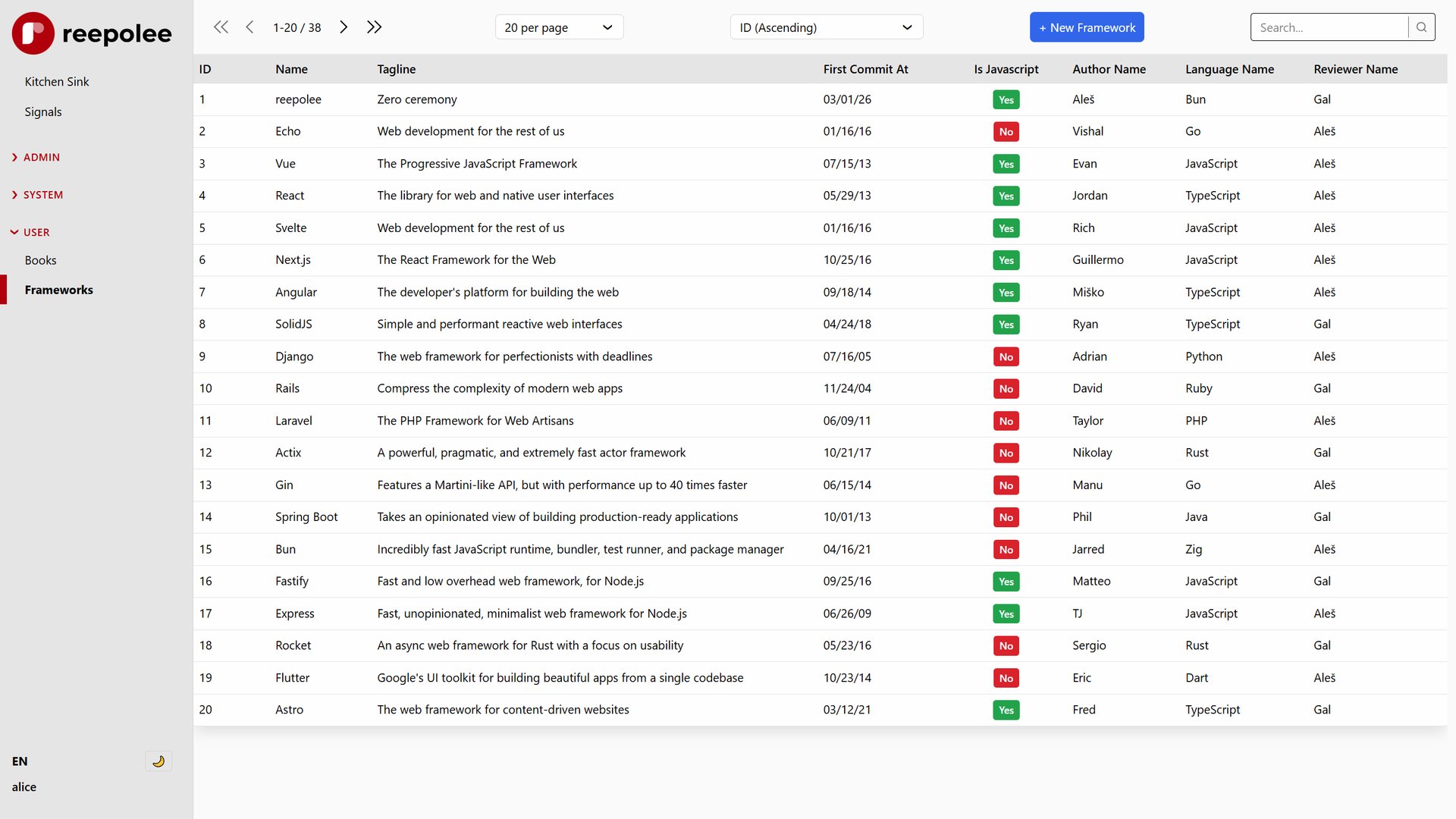
The CRUD step reads the schema files and writes the route handlers, SQL functions, and templates. The following URL pattern is registered for each resource:
| Method | Path | Handler |
|---|---|---|
GET | /<table> | List with search, sort, pagination |
GET | /<table>/new | Empty create form |
POST | /<table> | Create record |
GET | /<table>/:id/edit | Populated edit form |
POST | /<table>/:id/edit | Update or delete record |
POST | /<table>/validate | Real-time field validation |
The list view supports URL-driven state - search query, sort field, sort direction, pagination position (offset, or cursor params), and per-page limit are all carried as query parameters, making every filtered view bookmarkable and shareable. The pagination row in index.ree renders four navigation controls - first, previous, next, last - driven by first_url, prev_url, next_url, and last_url returned from the handler. Each one renders as a disabled icon when there's nothing to navigate to, so the bar stays visually stable on the first and last page rather than reflowing when a button appears or disappears.
A few details the generator handles automatically:
- Two pagination strategies. Offset (the default) and cursor (keyset), selectable per-route - see Pagination below.
- Sort options from
id,display, and indexed columns. The sort dropdown always includes the primary ID and canonical display label, then adds indexed columns (stored asindexed_columnsintable.ts). FK IDs resolve to their<relationship>_displayview column when available. Columns inIGNORE_ORDER_FIELDSare excluded. - Fulltext search. When a table has a
search_textcolumn, search uses a fulltext query (MySQLMATCH … AGAINST, SQLiteLIKE) instead ofLIKE '%term%', vialib/sql_dialect.ts. Requires a MySQL FULLTEXT index. - Cache + scope integration. Each generated
sql.tsexportsTABLE_NAMEandVIEW_DEPENDENCIES, and list queries run through the optional SQL cache with the active global scope folded into the cache key.
Pagination
Generated list views support two pagination strategies, chosen at generation time with --pagination and recorded as a pagination_strategy export in config.ts:
export const pagination_strategy: "cursor" | "offset" = "offset";
The generator branches on this value at codegen time - there is no runtime switch - producing the matching SQL, URL-param parsing, pagination-URL building, and template rendering. It defaults to "offset" when the export is absent (the same once-and-edit pattern as enable_delete).
| Strategy | SQL | URL params | Position display | Notes |
|---|---|---|---|---|
| Offset (default) | LIMIT ? OFFSET ? | offset, limit, order_by, query, scope | range, e.g. 21-40 / 100 | Supports global scopes. Nested children always use offset. |
| Cursor (keyset) | WHERE (sort > val OR (sort = val AND id > id)) LIMIT N | after, before, last, limit, order_by, query, scope | count, e.g. 40 / 100 | Deep pages stay fast and don't skip/duplicate rows when data shifts underneath. No numbered page links. |
Both render the same first/prev/next/last icon-button bar. Offset is the better default for admin grids where a stable, jump-to-page range display matters; choose cursor for large or fast-changing tables where deep-page performance matters more than positional display.
Streaming List Views (DPU)

A generated list view can render synchronously (the default) or stream its records as Declarative Partial Updates (DPU), selectable per-route via the render_strategy export in config.ts:
export const render_strategy: "stream" | "load" = "load";
"load"(default) - runs the DB queries, then returns one fully-renderedResponse."stream"- renders the page shell (layout, nav, controls) immediately as the first chunk of aReadableStream, then streams the pagination bar and record rows as<template for="…">chunks once the DB queries resolve. The shell appears instantly even when the query is slow; the rows fill in when ready.
Like pagination, the generator branches on this value at codegen time (no runtime branching), selecting the streaming GET-handler template (offset or cursor variant) and wrapping the records/pagination regions in <?start name="…"> / <?end> DPU markers in index.ree.
Streaming relies on a small vendored polyfill (static/dpu.min.js, GoogleChromeLabs' HTML <template> setters polyfill, fetched by bun get:dpu). Its <script> tag in apps/main/layout.ree ships commented out - uncomment it when you deploy streaming to production.
Prefixed Routes
The --prefix flag scopes a resource under a sub-path. This is the standard way to build an admin panel:
bun reeman crud users --prefix admin
Files are written to apps/main/admin/users/ and apps/main/routes.ts is updated to mount them with mount_prefix:
...mount_prefix("/admin", admin_users_crud, require_module_mw("admin")),
The second argument to mount_prefix is an optional middleware guard. require_module_mw("admin") redirects any request from a user who doesn't have the admin module in their users.modules_tags field before the handler runs. You can swap it for require_auth_mw() or any custom middleware. Available modules are loaded from the modules table - see Authorization.
Nested Resources (Parent/Child)
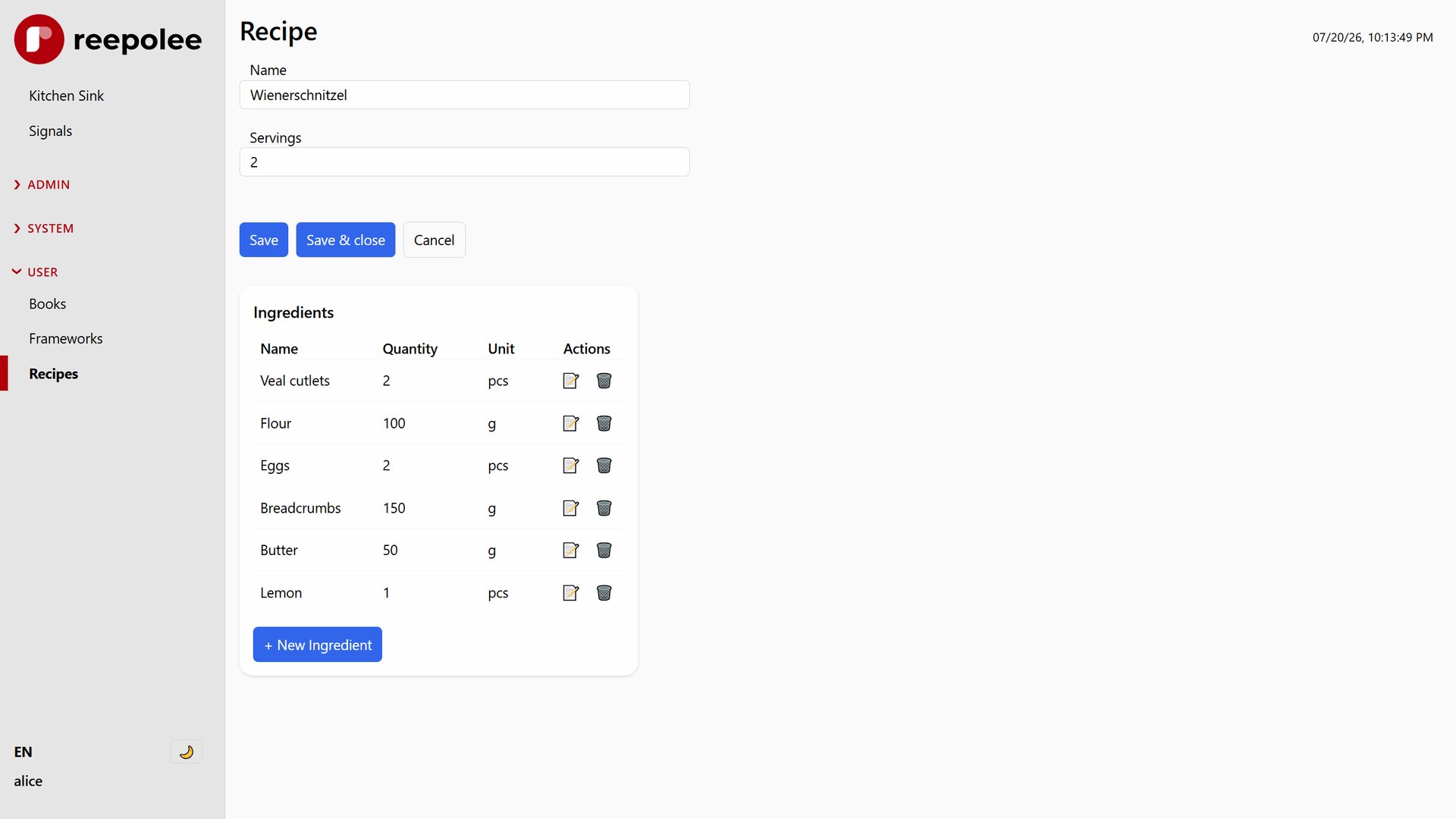
The --parent <table> flag generates a resource as a child of another table - records scoped to a single parent and managed under nested URLs like /orders/:order_id/items:
bun reeman crud items --parent orders
The parent foreign key is auto-detected from the child table's FK constraints at introspection time and recorded as a parent export in config.ts, which you can override:
export const parent = {
    table: "orders", // parent table
    fk_column: "order_id", // FK column in THIS table
    route_param: "order_id", // URL param name
};
What nesting produces:
- Child routes carry the parent segment:
POST /orders/:order_id/items(create),GET /orders/:order_id/items/new, andGET|POST /orders/:order_id/items/:item_id/edit. There is no dedicated child index page and no bulk-delete - children are viewed on the parent's edit form. - Scoped SQL. Every child query takes the parent id and filters
WHERE parent_fk = ?; single-record lookups also verify the parent matches, so you can't reach a child scoped to a different parent. - Parent integration. The generator edits the parent's files too: the parent
sql.tsgains aget_<children>_by_<fk>()query, the parentindex.tsedit handler loads the children, and the parentform.reegets a managedcrud:childrenmarker section rendering an inline child list (all rows, no pagination/search/sort, with edit + delete actions). - Return-URL flow. Child new/edit forms hide and pre-fill the parent FK and set
_return_urlback to the parent edit page, so create/update/delete redirects land on/orders/:order_id/edit.
Nesting is single-level (parent → child); a parent can have multiple children. The parent FK field in the child form renders as a hidden input inside a <field-wrapper> and is excluded from validation since it's set programmatically.
Excluding Tables with crud-ignore
Besides IGNORE_TABLES in config, you can exclude a table directly from the database by adding the tag crud-ignore to its table comment. Tagged tables drop out of reeman table listings, the bulk CRUD generator, and the crud all generation path - handy for internal/system tables and join tables you annotate in the schema rather than in code. The tag is case-insensitive. (MySQL only - SQLite has no table comments.)
Configuration
The generator respects several settings in config/db_structure.ts (full reference: Database Structure Config):
export const IGNORE_TABLES = ["modules", "sessions", "email", "images", "files", "users", "translations", "db_tables", "db_routes"] as const;

export const MAINTENANCE_FIELDS = ["created_at", "updated_at", "archived_at", "archived_by_user_id"] as const;

export const DATE_SUFFIXES = ["_on", "_by"] as const;
export const DATETIME_SUFFIXES = ["_at"] as const;

export const IGNORE_INDEX_FIELDS = [
    "display",
    "option_display",
    "option_text",
    "search_text",
    "hashed_password",
    "previous_hashed_password",
] as const;

export const IGNORE_ORDER_FIELDS = ["option_display", "search_text", "hashed_password", "previous_hashed_password"] as const;

export const BOOLEAN_PREFIXES = ["is_", "has_", "can_"] as const;

export const MIN_PASSWORD_LENGTH = Bun.argv.includes("--dev") ? 1 : 8;
IGNORE_TABLES - Tables the generator skips entirely. Add tables that don't need a UI here. The shipped list excludes framework tables (sessions, modules, images, files, users, translations, db_tables, db_routes) and the hand-written email admin. You can also exclude a table from the database side with the crud-ignore table comment.
MAINTENANCE_FIELDS - Fields managed by the database itself. Excluded from form schemas and from user-supplied write payloads; still readable on edit pages as read-only timestamps.
DATE_SUFFIXES / DATETIME_SUFFIXES - Column-name suffixes that signal date or datetime fields. A column ending in _on or _by (incorporated_on, payment_due_by) gets the date codec applied; a column ending in _at (created_at, verified_at) gets the datetime codec. The codecs handle conversion between database format and the format HTML date inputs expect.
IGNORE_INDEX_FIELDS - Fields hidden from the list table. display and option_display remain available to generated code but are not default columns; the resolved <relationship>_display fields in a view are the human-facing grid labels. The list also excludes sensitive values (hashed_password, previous_hashed_password) and internal search/option fields. For per-column control without a global list, use the CU visibility flag in the column comment instead.
IGNORE_ORDER_FIELDS - Columns excluded from the sort dropdown even when they're indexed. Mirrors IGNORE_INDEX_FIELDS but for ordering - keeps internal columns like search_text and password hashes out of the sort options.
BOOLEAN_PREFIXES - Column names starting with these prefixes are rendered as a Yes/No select instead of a checkbox. Useful when you want the value to be explicit ("Yes" or "No") rather than depending on whether a checkbox was checked.
MIN_PASSWORD_LENGTH - Minimum length enforced by the auth flows. Relaxed to 1 in development (--dev flag) so test accounts are easy to create; hardened to 8 in production.
Translations
The generator produces auto-generated labels for each field (e.g. created_at becomes "Created at"). It also writes the resource's navigation label directly into its {locale}.json files (key_path = "nav"), so a freshly generated resource shows up in the sidebar without editing JSON. Generation adds missing English keys but keeps existing file values, including edits you made by hand. The co-located JSON files are the source of truth for translations - see Translations.
To fill in missing translations automatically, pass --translate:
bun reeman crud users --translate
This calls the configured AI provider (OpenRouter/Claude Haiku by default, or Ollama / Hugging Face - see Dynamic Translations) to translate every missing key.
To fill keys missing across locales after the fact, sync-translations scans the JSON files, AI-translates any key present in one locale but missing in another, and writes the results back to the files:
bun reeman sync-translations --translate
To find and fill keys referenced in templates but not yet in the JSON files - or to prune keys no longer referenced by any template - use the Sync missing translations and Prune unused translations reeman tools. Both edit the JSON files in place. See Translations for the full file-first workflow.
Editing Generated Files
Not all generated files are equal:
| File | Safe to edit? |
|---|---|
config.ts | Yes - written once, route settings are project-owned |
schema.generated.ts | No - regenerated from database introspection |
validation_server.ts | Yes - written once, add project validation here |
index.ts | Yes - written once |
sql.ts | Yes - written once |
index.ree | Yes - written once |
form.ree | Yes - written once |
table.ts is the intended customisation point for the schema layer. Change column labels, swap an input type, adjust the grid layout, or add display-only computed fields - none of those changes will be lost when you re-run the generator.